Category: All

  • Getting Visible After 4 Years

    Getting Visible After 4 Years

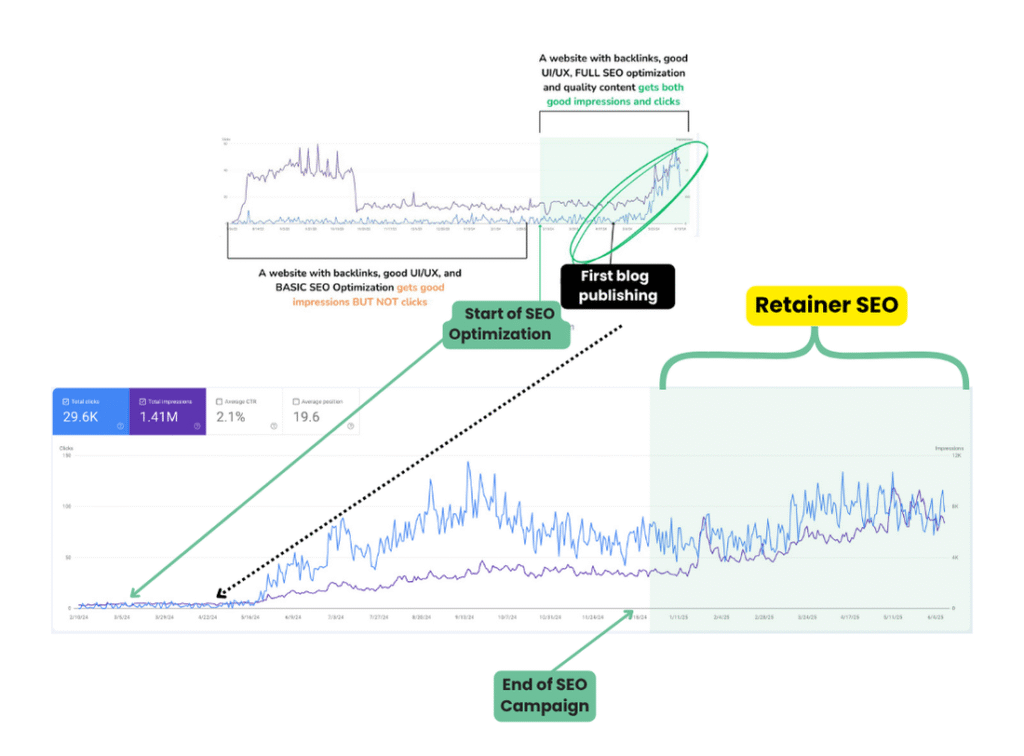
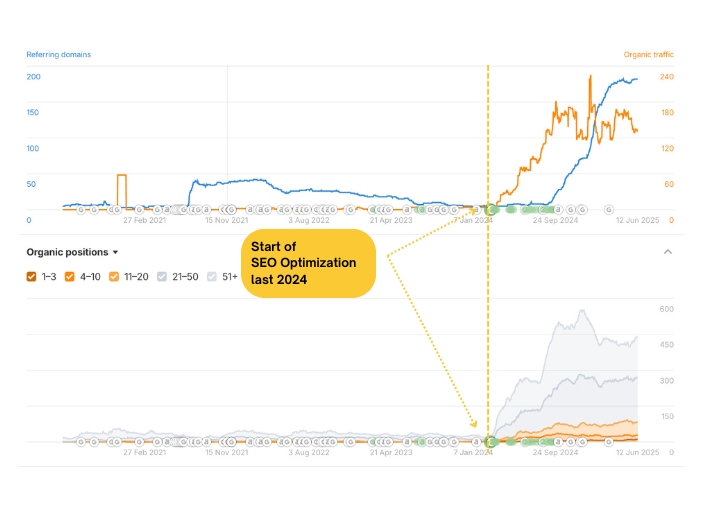
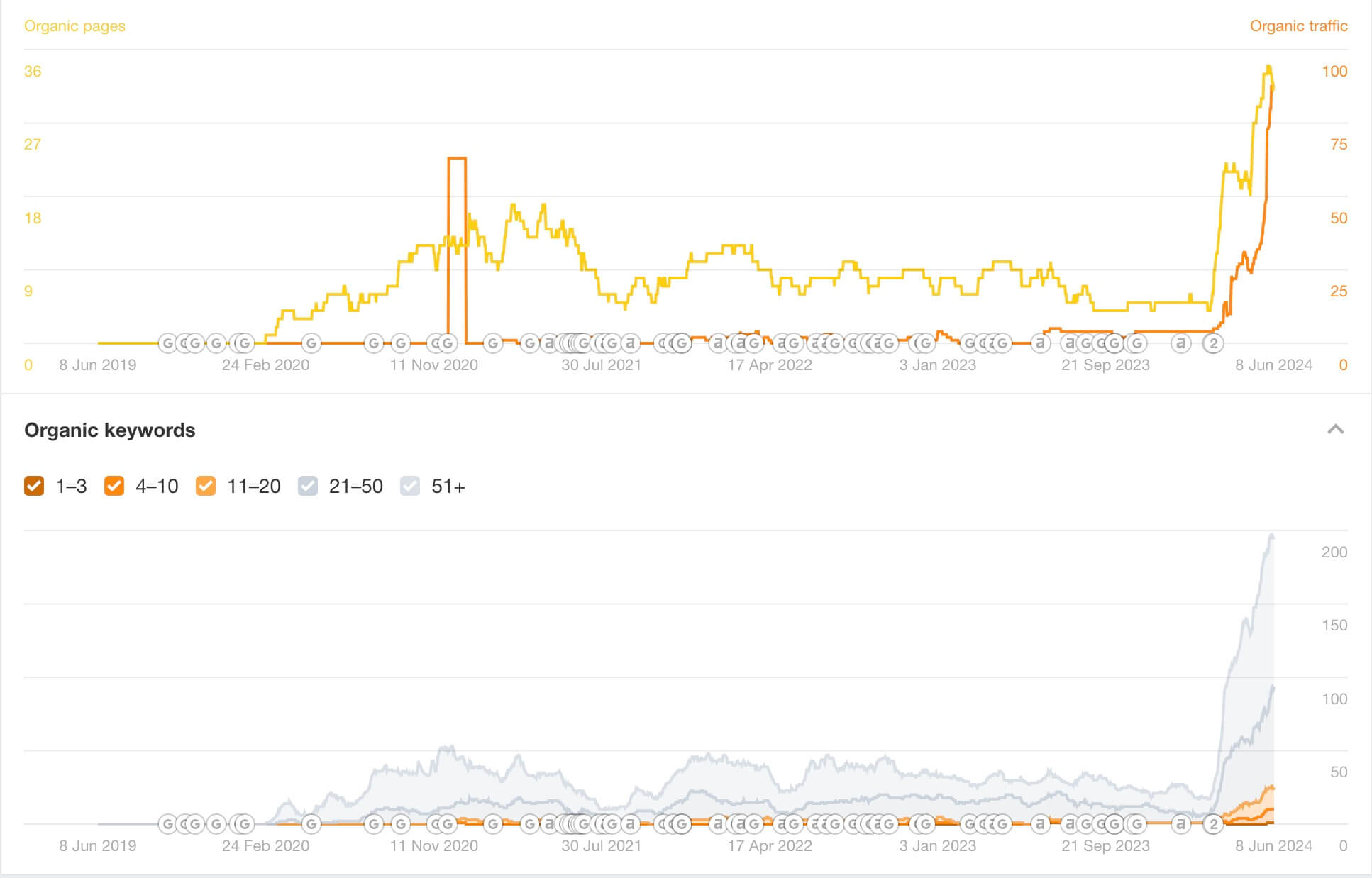
    This therapist website has been on the space for 4 years and it was only after our SEO campaign that they were able to improve their visibility and they were able to maintain the momentum I created for them by continuously publishing targeted content.

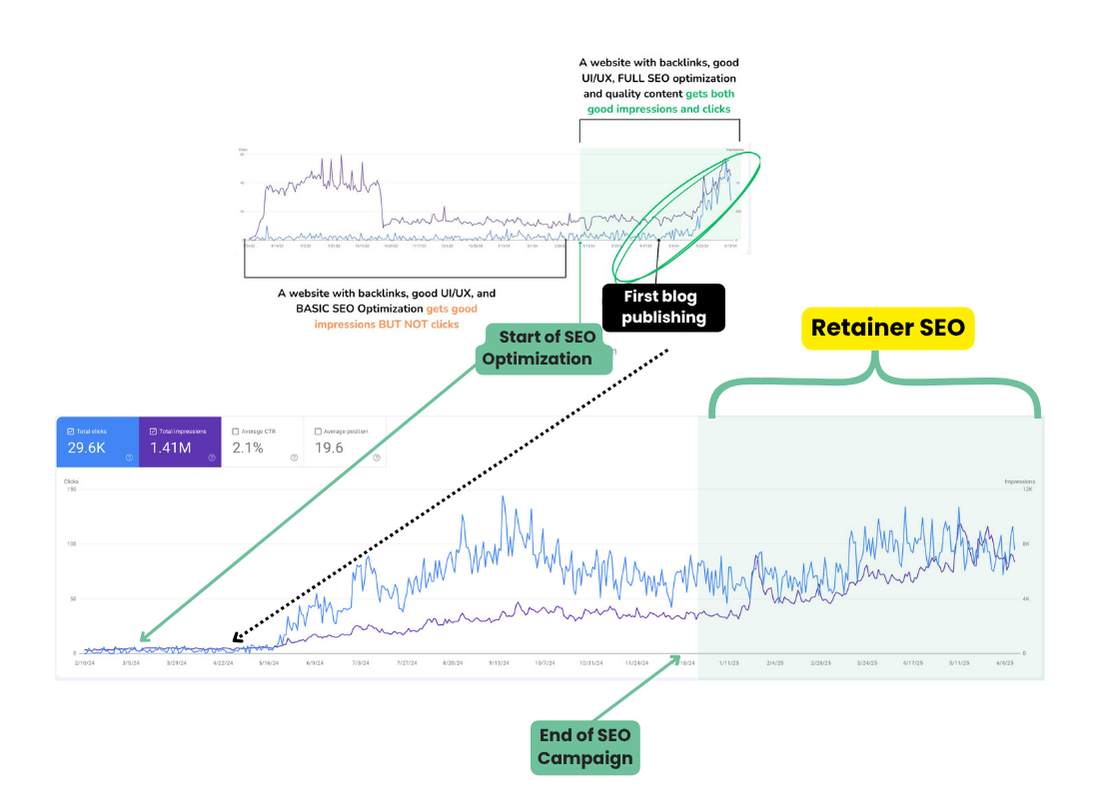
    If you’re not a new website and you’re struggling to rank, this is almost what it’s like when you get the basic SEO optimization.

    My SEO services makes sure that not only will you rank even after my campaign has ended, but you can also sustain the momentum and metric gained as long as you create quality content.

    Continuous Improvements After the SEO Campaign

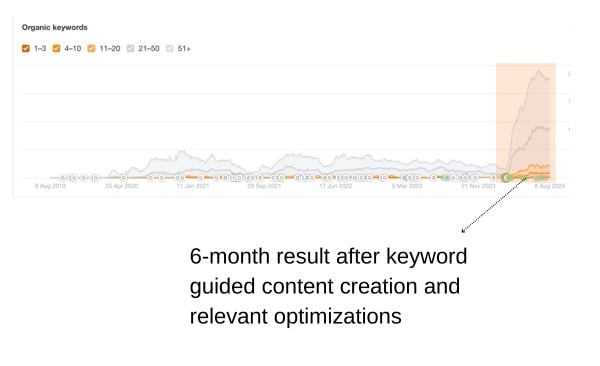
    And just before we dive into the details here’s an update of the site’s performance months after the end of the campaign.

    While they did not avail of the SEO retainer services, the website was able to continuously improve its visibility with the help of continuous content creation and optimization (guided by the video guides I gave on the last SEO report).

    The Challenge

    A Squarespace Website Created in 2020 strugging with visibility

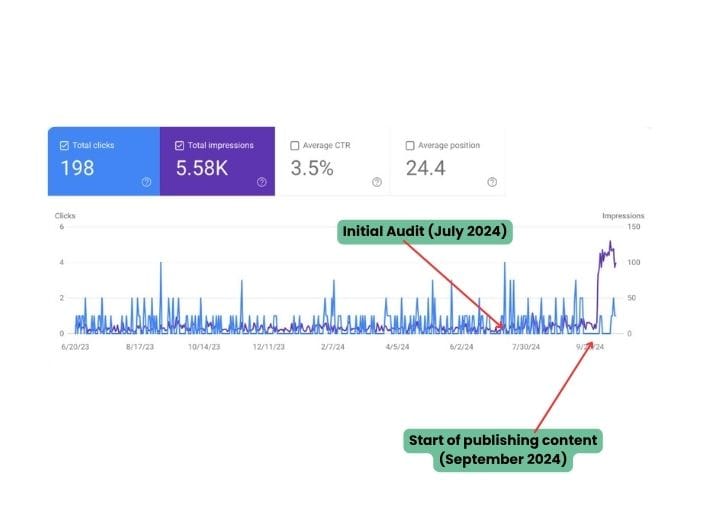
    This Squarespace therapy website was first created last 2020 and when I first audited it, I looked at the 16-month lookback and saw that it only had about 3690+ impression during that month range which can translate into like just almost like 7-8 impressions in a day (image below).

    Initial 16-month lookback and metrics audit

    The following is the website’s metrics just before I started implementing my strategy.

    The website clearly needed technical, on-page, off-page and content strategy for it to rank in the span of 6 months.

    The Solution

    Focusing on low-hanging wins to move the needle

    When on the first month, a few technical, on page and off page strategies were implemented on the site that gave a few nudges to help the site’s initial metrics.

    Below are some of my recommendations for the site to make sure that the website is able to rank even after the campaign:

    1. Creation of additional service page and location pages
      This was done to help the site create more visibility for her target customers and accumulate content and relevancy for their target location.
    2. Keyword research for blog posts to target client pain points
      This is mostly one for the things that gives the best result to help funnel the right clients that are looking for the therapist services. We made sure to create and schedule one blog for them four months since the first and second month content were consumed by the creation of service and location pages.
    3. Technical optimizations and keyword targeting were done to the website’s existing and new pages to make sure that exisiting structure and each content published during our campaign are aligned towards the goal of ranking the right keywords.
    4. A simple offpage strategy was created to make sure that the website has enough reputation to help the new content rank with the targeted keywords for the services.
    5. Templated pages for easy SEO implementation after the campaign. Since my SEO strategy is mostly about making a new website easily sustainable for clients, I made sure that they had templated location and blog pages that they can tweak and customize if they plan to continue publishing after our campaign.

      Video guides are included and are downloadable in the last SEO report to make sure that they can save details on how to maintain the SEO optimizations done on the site.

    The second and third month involved content creation and approval process so that we could start pushing the content on the last week of the second month.

    The Result

    Finally Visible

    Improvement in impressions were seen by mid September. This was driven by the optimized new service pages, keyword realignment on the existiing pages and topic authority gained from the backlinks acquired.

    By the end of the campaign (December 2024), we were able to significantly increase the website’s visibility for their brand name, services and location.

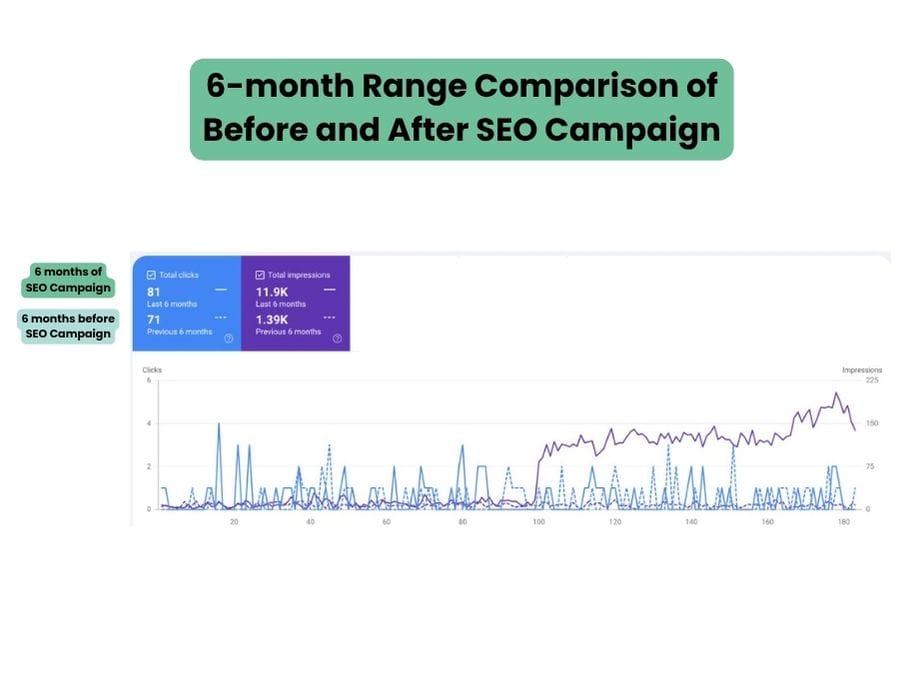
    Below is a 6-month range comparison of the before and after the SEO campaign and difference in site metrics that we recorded.

    • Great Improvement in Visibility: You can clearly see from the GSC data above that impressions greatly increased as compared from the previous 6 months without SEO optimizations. This increase in impressions is a signal that the website is now showing up for more terms/keywords/queries searched for by people .
    • Increase in topic authority: The off-page links acquired has helped the website increase its Domain Rating or topic relevancy coming from the other niche relevant websites that are pointing to the client’s website.
    • Improved site health: This is achieved by fixing technical and structural website issues. This includes fixing redirections, interlinking, content formatting and making sure that all urls and upcoming ones will be crawled and indexed.

    This case study is another testimony that a website that is optimized for sustainability is better than getting optimization that only diminishes after the end of campaigns.


    If you’ve have a number of SEO Specialists before and you’re struggling to get actual results in a minimum of 6 months, then maybe they are not addressing the root issues needed by your website.

    Read more case studies or articles about on-page SEO and technical SEO. You can also check out my available services:


    Frequently Asked Questions

    Can you do the same for my website?

    Yes I can create a strategy for you that is customized for your website need and target outcome. Implementation time may vary in time depending on your budget and results are also variable due to the different competitiveness of different business niches.

    You can set up a call/email exchange with me for a free consultation.

    What did you actually do on this project?

    I did everything from initial audit, monitoring, on page, and technical SEO optimizations on WordPress , keyword research, and content strategy.

    The content creation was done by their writer guided by my keyword research.

    Which package did they get?

    They chose the Custom package since they have their own writer and I implemented the new content and mostly everything in my strategy for the site.

  • You can rank without blogs.

    You can rank without blogs.

    This WordPress website was a private therapy group that opted to not create blogs.

    I would usually recommend creating blogs to create initial traffic and target keywords but it is also possible to rank without blogs, but this was only possible for them because they had a different kind of fresh content that they push through once every few months.

    One common thing that gets overlooked is keeping your content fresh and relevant. Search engines love updated, useful content and it’s the reason why I recommend creating blogs—and when that’s combined with smart SEO, it can really make a difference.

    If your site isn’t regularly publishing new content or updating old pages, that could be one of the reasons you’re not getting the traction you want.

    But how was it effective for this website?

    Continuous Improvements After the SEO Campaign

    And just before we dive into the details here’s an update of the site’s performance months after the end of the campaign.

    Remember how my usual 6 months of SEO gets a great spike in impressions just before the end of the campaign? Well this website did not have that since they opted to not have blogs, so I devised a different strategy for them that works better for their desired post-SEO maintenance.

    The Challenge

    This WordPress website didn’t want blogs but they already had brand traffic yet not much for their services and target locations.

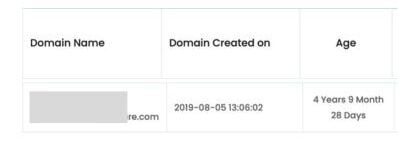
    This is an aged domain/website (more than one year after creations) and was created first last 2020.

    When I first audited the website last March 2024, I found out that it did not have a sitemap submitted yet on their Google Search Console, so that was the first thing I did. This is the reason now why a 16-month lookback will show the date 3/7/24.

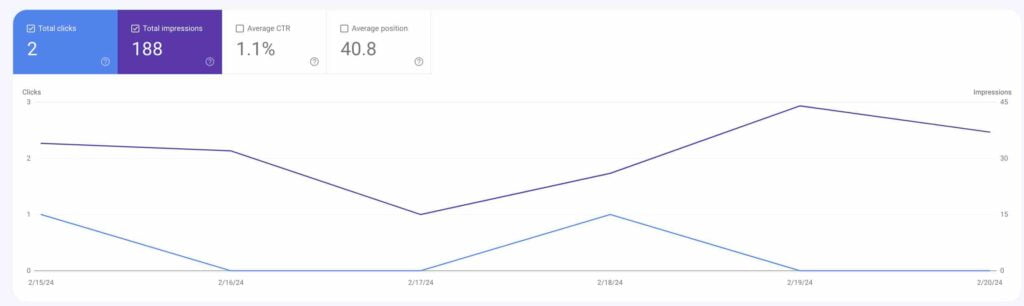
    Below are the first two months of the website’s Clicks and Impressions.

    You can see that the website’s Clicks and Impressions already doesn’t touch the zero-clicks/impressions in a day which means that they have already existing organic traffic that we need to build upon for improvement.

    The Solution

    No blogs but a lot of content creation

    Usually I would recommend publishing blogs since this website already has good reputation from Google and could easily rank higher with new and fresh content. But they mentioned that blogs are unsustainable for them so I had to create a strategy that accounts for that.

    Below are some of my recommendations for the site :

    1. Creation of Specific Service Pages
      Initially, the website only had a general overview of their services, which limited its visibility in search results. I recommended creating dedicated pages for each individual service they offer.

      This helps search engines understand the full scope of their offerings and allows each page to be optimized for relevant keywords. It also improves user experience by making it easier for potential clients to find exactly what they’re looking for.

    2. Internal Linking Between Therapist Profiles and Service Pages
      The existing therapist profile pages were then to be rewritten with added details that can be interlinked to the new service pages. I suggested building strong internal links between these pages to create a clearer site structure and keyword signaling and association for the new service pages.

    3. Adding Therapist Pages to the Sitemap
      The therapist profile pages were missing from the sitemap, which meant search engines might not even be aware they existed.

      I made sure to include these pages in the sitemap to ensure they are properly crawled and indexed. This small step can significantly improve the chances of those pages appearing in search results.

    4. Simple Off-Page SEO Strategy
      To support the site’s authority and help the new service pages rank for their targeted keywords, I implemented a basic off-page SEO strategy. This included building high-quality backlinks from relevant and reputable websites, as well as making sure the site had mentions in online directories and professional listings.

      These off-site signals help build trust with search engines and improve the overall visibility of the content.

    The Result

    Quick Improvement in Queries and why the strategy was effective

    The website had a quick improvement in Queries from 203 (March 2024) to 1000 (May 2024). 1000 is the maximum Top Queries shown in Google Search Console.

    Impressions (violet line) continued to improve to date as shown from below:

    But how did this strategy become effective for them? This was only possible because they had more than 25 therapist profiles and they routinely add and deleted profiles, this could have given a signal to Google that they keep their content fresh.

    This website could have improved more if they created a blog but what’s more important is that they have established stability and still had improvements even after the SEO services ended.

    This case study is another testimony that a website that is optimized for sustainability is better than getting optimization that only diminishes after the end of campaigns.


    If you’ve have a number of SEO Specialists before and you’re struggling to get actual results in a minimum of 6 months, then maybe they are not addressing the root issues needed by your website.

    Read more case studies or articles about on-page SEO and technical SEO. You can also check out my available services:


    Frequently Asked Questions

    Can you do the same for my website?

    Yes I can create a strategy for you that is customized for your website need and target outcome. Implementation time may vary in time depending on your budget and results are also variable due to the different competitiveness of different business niches.

    You can set up a call/email exchange with me for a free consultation.

    What did you actually do on this project?

    I did everything from initial audit, monitoring, on page, and technical SEO optimizations on WordPress , keyword research, and content strategy.

    The content creation was done by their writer guided by my keyword research.

    Which package did they get?

    They chose the Custom package since they have their own writer and I implemented the new content and mostly everything in my strategy for the site.

  • Long Tail Keywords in SEO: An Elderly Care Website’s Success

    Long Tail Keywords in SEO: An Elderly Care Website’s Success

    I’ve always been a fan of long tail keywords in SEO and my content strategy to help a domain get their first traffic traction. This is what exactly what my strategy was for an elderly care website.

    This a specific strategy that works for Home Care SEO.

    A home health care website struggling to gain organic traction tapped for my services and, this approach became the game-changer. Over the course of a year, a focused strategy on long-tail keywords not only boosted the site’s search engine rankings but also drove meaningful engagement and conversions.

    This case study explores how targeting specific, user-focused search terms helped turn an underperforming website into a thriving online resource in a competitive niche.

    The Challenge

    When I first took on this project, the website was barely making a dent in the digital space.

    With only 16 outdated articles, it was failing to attract traffic or engage potential clients. In the home health care industry, where families and caregivers often search for highly specific information, the site was virtually invisible.

    The challenge was clear: transform this dormant platform into a dynamic, traffic-generating hub that could connect with its audience and drive real results.

    Our goals for the website were ambitious but focused:

    1. Boost Visibility with Long-Tail Keywords in SEO: Improve search engine rankings by targeting specific, less competitive phrases that matched the exact needs of the audience.
    2. Enhance Engagement and Conversions: Create content that resonated with users, encouraging them to stay longer, explore more, and ultimately convert into leads.
    3. Establish Thought Leadership: Position the website as a trusted authority in the home health care industry, offering valuable insights and guidance to its audience.

    The Strategy

    To achieve these objectives, we developed a multi-faceted SEO strategy centered around long-tail keywords in SEO. Here’s how we made it happen:

    1. The Power of Long-Tail Keywords in SEO

    Long-tail keywords—those longer, more specific search phrases—were the backbone of our approach. While they may have lower search volumes compared to broader terms, they often have higher conversion rates because they align closely with user intent. Here’s what we did:

    • In-Depth Keyword Research: We started by identifying long-tail keywords that reflected the specific concerns and questions of people searching for home health care services. For example, instead of just targeting “home health care,” we focused on phrases like that answers their queries about elderly management, and lifestyle changes.
    • Content Creation: Over the course of a year, we published 32 new articles, each carefully optimized for the long-tail keywords we identified. These pieces were designed to address the nuanced needs of our audience, providing practical advice, answering common questions, and offering solutions to real problems.

    2. On-Site SEO Enhancements

    To maximize the impact of our content, we also made several on-site optimizations:

    • Optimized Service Pages: We created dedicated pages for each service the company offered, ensuring they were not only search-engine-friendly but also user-friendly. Each page was tailored to answer specific questions and guide visitors toward taking action.
    • Strategic Interlinking: By linking related articles and service pages, we improved the site’s internal structure. This made it easier for search engines to crawl and index the site while also helping visitors find the information they needed.
    • Revamping Existing Content: The 16 original articles were given a complete overhaul. We updated the information, improved readability, and optimized them for the long-tail keywords we identified.

    Results

    The results of my efforts were nothing short of transformative. Here’s what we achieved:

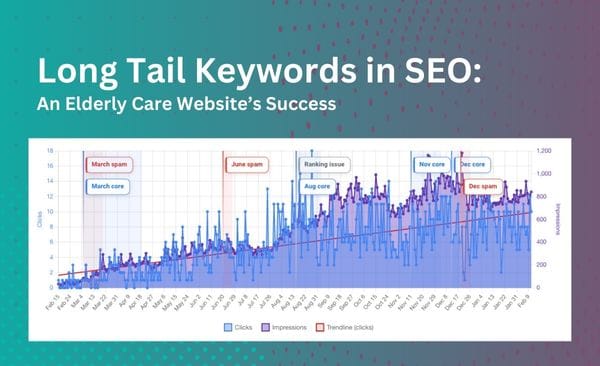
    • Early Traffic Gains: Within just two months of implementing my strategy, the website started to see consistent traffic. In less than 6 months, days with zero clicks became a thing of the past, and we began to see steady growth in organic clicks.
    • Increased Engagement: Visitors were spending more time on the site, exploring multiple pages, and engaging with the content. This was a clear sign that we were meeting their needs and providing value.
    • Conversion Rate Growth: By the end of the year, the website saw a 60% increase in lead conversions. This was a direct result of our targeted content strategy and the improved user experience we created.

    This case study is a testament to the power of long-tail keywords in SEO, especially in specialized industries like elderly health care. By focusing on the specific needs and search behaviors of their audience, the website was able to rise above the competition and establish itself as a trusted resource.

    The success of this strategy wasn’t just about driving traffic—it was about creating meaningful connections with users and guiding them toward taking action. For businesses in competitive niches, this approach offers a clear roadmap for achieving sustainable growth and building a strong online presence.

    In the end, the senior health care website didn’t just improve its metrics—it became a go-to destination for families and caregivers seeking reliable information and support. And that’s the true measure of success.

    Why Long Tail Keywords in SEO Work

    Long tail keywords in SEO work because they tap into the specific intent of users. When someone searches for “24/7 in-home care for elderly parents,” they’re not just browsing—they’re looking for a solution. By targeting these precise phrases, businesses can attract highly qualified traffic that’s more likely to convert.

    For anyone looking to improve their SEO strategy, especially in a competitive niche, long-tail keywords are a powerful tool. They may require more effort in terms of research and content creation, but the results speak for themselves.

    Final Thoughts

    If your website is struggling to gain traction, consider the potential of long-tail keywords in SEO.

    Because by understanding your audience’s specific needs and crafting content that speaks directly to them, you can unlock new levels of visibility, engagement, and growth.

    Content is king, and strategy is queen.


    Frequently Asked Questions

    Can you do the same for my website?

    I can help you set up your struggling website.

    You can set up a call/email exchange with me for a free consultation.

    What did you actually do on this project?

    I was responsible for the initial audit, strategic plan for 12 months, on page, content and technical optimization planning as they have a different team for execution.

    I wrote the content for them.

    Were you in charge of the setup of their Google Search Console account?

    Yes, they did not have any GSC setup when I first audited the site.

  • Blogging Benefits for Business: A Sample of Success

    Blogging Benefits for Business: A Sample of Success

    You might think that having a website is enough to attract visitors, especially if your SEO specialist is boasting about building tons of backlinks.

    But here’s the thing: backlinks alone won’t cut it. Sure, they help, but their impact is minimal without high-quality content and a solid content strategy driven by keyword research.

    Let’s dive into a real-life example to show you why blogs are a game-changer for your website’s success.

    A Year After the SEO Campaign

    And just before we dive into the details here’s an update of the site’s performance a year after.

    Blogging benefits for business

    The Challenge

    A Website Struggling to Rank

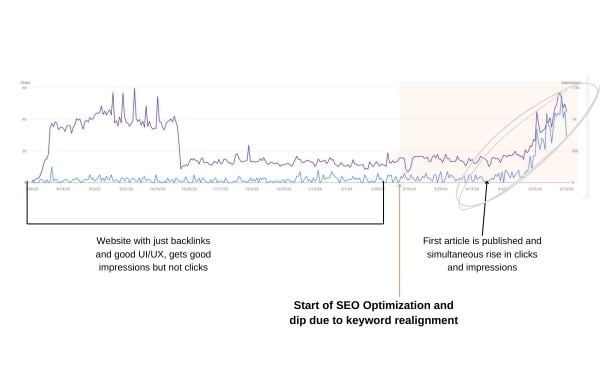
    This website launched in July 2023 with high hopes of improving its online visibility. The team focused heavily on building backlinks, believing they were the key to ranking higher on search engines. At first glance, it seemed like they were on the right track.

    The Data: Backlinks vs. Organic Traffic

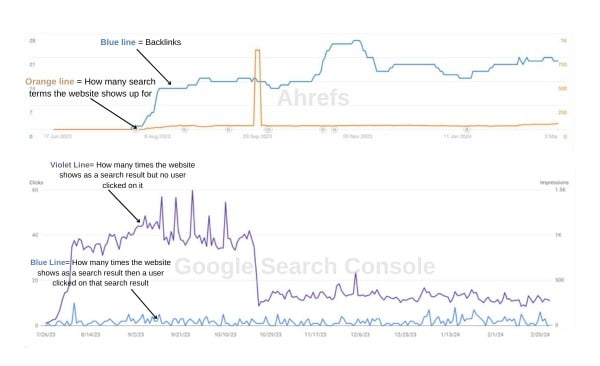
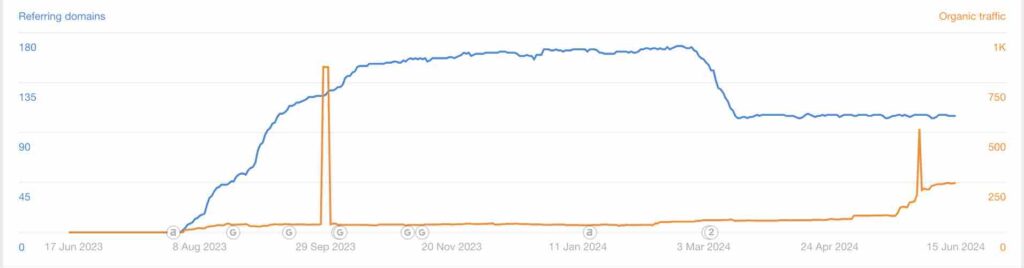
    Using Ahrefs, we analyzed the website’s performance before any major changes were made. Here’s what we found:

    • Backlinks (Blue Line): The website had been building backlinks consistently since its launch.
    • Organic Keywords (Orange Line): Despite the backlinks, the website struggled to rank for relevant keywords.

    Next, we looked at the Google Search Console (GSC) metrics:

    • Clicks (Blue Line): This represents how often users clicked on the website after it appeared in search results.
    • Impressions (Violet Line): This shows how often the website appeared in search results, even if users didn’t click.

    The data revealed a critical issue: while the website had a decent number of impressions (thanks to backlinks), it wasn’t translating into clicks. This meant the website wasn’t ranking for the right keywords, and users weren’t finding the content relevant enough to click on.

    Interestingly, there was a brief spike in organic keywords in September 2023, but this didn’t result in a corresponding increase in clicks or impressions. This further highlighted the disconnect between backlinks and actual user engagement.

    The Solution

    A Holistic SEO Strategy

    When I took over the website’s SEO in March 2024, I knew we needed a comprehensive approach.

    The solution 1

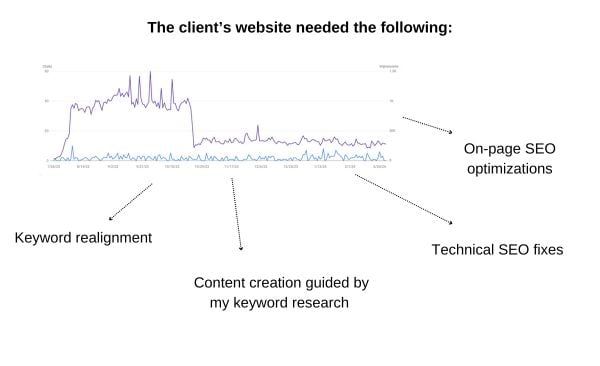
    Here’s what I proposed:

    1. Keyword Realignment: We identified and targeted keywords that were relevant to the website’s niche and audience.
    2. Content Creation: We developed a content strategy guided by keyword research to ensure every blog post addressed user intent.
    3. Technical SEO Fixes: We optimized the website’s technical aspects, such as site speed, mobile responsiveness, and crawlability.
    4. On-Page SEO: We improved meta tags, headers, and internal linking to make the website more search-engine-friendly.

    The Result

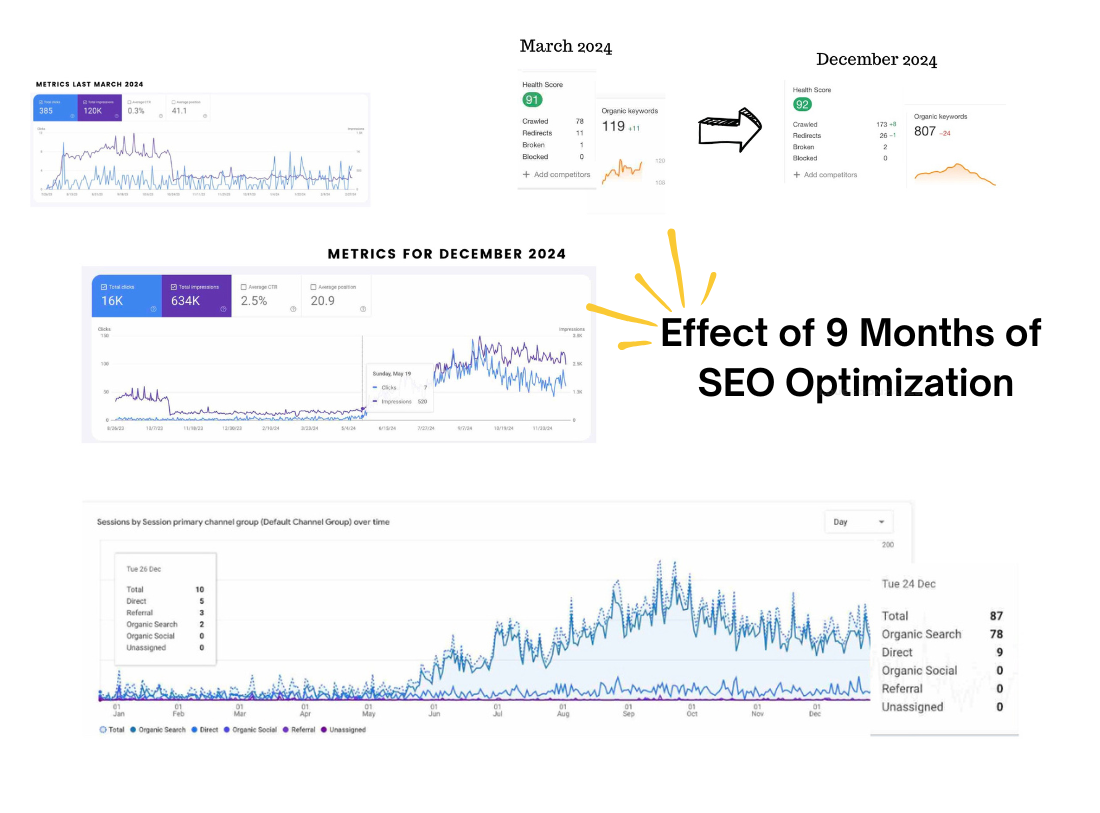
    What nine months of SEO optimization without much focus on backlinks can do for your site.

    By April 29, 2024, the first blog post was published. Over the next three months, we consistently published high-quality, keyword-optimized content. The results were impressive:

    • Improved Keyword Rankings: The Ahrefs graph confirmed that the website was ranking for more organic keywords, driving meaningful traffic.
    • 5 Articles Published: By June 15, 2024, the website had five new blog posts.
    • Increased Clicks and Impressions: The GSC graph showed a steady upward trend in both metrics, proving that the content was resonating with the target audience.

    You might wonder if the increase in traffic was due to more backlinks. But the Ahrefs graph below tells a different story.

    While backlinks (blue line) remained steady, it was the organic keywords—driven by quality content—that fueled the growth in organic traffic (yellow line) that corresponds to clicks and impressions.

    This case study clearly demonstrates that while backlinks can boost visibility, quality content is the real driver of traffic and engagement.


    You can see from the above Ahrefs graph that the website’s backlinks were definitely not the driver of clicks and impressions. It was the organic keywords that drove those, which also is a great example how having quality content is the best way to get traffic for your website than just having backlinks.

    THROUGH THIS CASE STUDY, ONCE AGAIN, WE PROVED THAT QUALITY CONTENT IS A GREAT DRIVER OF TRAFFIC AND ONLINE VISIBILITY THAN BACKLINKS.

    Why Blogs Are Important For Your Website

    More Reasons Why Blogs Are Crucial for Your Website

    Blogs aren’t just about SEO—they offer a host of benefits that can transform your website into a powerful marketing tool. Here’s why:

    1. Engages Visitors: Blogs encourage interaction through comments, shares, and discussions, helping you build a community around your brand.
    2. Showcases Expertise: Well-researched posts position you as an authority in your industry, earning trust from your audience.
    3. Supports Social Media: Blogs provide shareable content for platforms like LinkedIn, Twitter, and Facebook, driving traffic from social channels.
    4. Improves Conversion Rates: By addressing customer pain points and answering common questions, blogs guide users through the buyer’s journey.
    5. Builds Internal Links: Blogs allow you to link to other pages on your site, improving overall SEO and user navigation.
    6. Provides Value to Customers: Informative blogs help customers make better decisions, enhancing their satisfaction with your brand.
    7. Generates Leads: Include CTAs in your blogs to capture leads, whether through newsletter sign-ups, free downloads, or contact forms.
    8. Targets Long-Tail Keywords: Blogs let you rank for specific, less competitive keywords that often have higher conversion rates.
    9. Keeps Your Audience Informed: Regular updates keep your audience in the loop about industry trends, company news, and product launches.
    10. Enhances Brand Voice: Blogs help you develop a consistent tone and style, strengthening your brand identity.

    And the list goes on—from improving user experience to supporting email marketing, blogs are a versatile tool that can elevate your website in countless ways.


    Frequently Asked Questions

    Can you do the same for my website?

    Yes I can create a strategy for you that is customized for your website need and target outcome. Implementation time may vary in time depending on your budget and results are also variable due to the different competitiveness of different business niches.

    You can set up a call/email exchange with me for a free consultation.

    What did you actually do on this project?

    I did everything from initial audit, monitoring, on page, and technical SEO optimizations on WordPress , keyword research, and content strategy.

    The content creation was done by their writer and I only guided them with my keyword research.

    Which package did they get?

    They chose the Custom package since they have their own writer and they plan to implement an SEO strategy for one year.

    Read more case studies or articles about on-page SEO and technical SEO. You can also check out my available services:

  • “Do I need a sitemap?” Yes don’t skip it.

    “Do I need a sitemap?” Yes don’t skip it.

    So, you’ve just launched your shiny new website.

    Congratulations! You’ve put in the hard work, designed it beautifully, and filled it with content you’re proud of. But here’s the thing: just because your website is live doesn’t mean people can find it. If you’re wondering why your site isn’t showing up in Google searches, the answer might be simpler than you think—your sitemap.

    In this article, we’ll dive deep into why sitemaps are crucial, how to create and submit one, and what happens if you get it wrong. Plus, I’ll share a real-life case study about the below image to show you the impact of having the right sitemap in place.

    DO I NEED A SITEMAP FOR MY WEBSITE

    Yes, that little file you might have overlooked is actually a big deal. A sitemap is like a roadmap for search engines. It tells them where to find all the important pages, posts, and images on your site. Without it, your website is like a hidden treasure chest buried deep in the sand—no one knows it’s there, no matter how valuable it is.

    By the end, you’ll have a clear understanding of how to make your website visible to search engines—and, more importantly, to your audience.

    What is a Sitemap, and Why Does It Matter?

    Let’s start with the basics. A sitemap is a file that lists all the pages, posts, and other content on your website. It’s essentially a directory that helps search engines like Google, Bing, and others crawl your site more efficiently. Think of it as handing over a map to a treasure hunter—it makes their job a whole lot easier.

    Here’s why a sitemap is so important:

    1. Helps Search Engines Find Your Content: If your site is new or has a lot of pages, search engines might not discover all your content on their own. A sitemap ensures they know where to look.
    2. Improves Indexing: Indexing is the process where search engines add your pages to their database. Without a sitemap, some of your pages might never get indexed, meaning they won’t show up in search results.
    3. Speeds Up Crawling: A sitemap tells search engines which pages are most important and how often they’re updated. This helps them prioritize crawling your site.
    4. Boosts Visibility: When your pages are indexed, they’re more likely to appear in search results, which means more traffic for your site.

    The Problem

    What Happens When You Get It Wrong

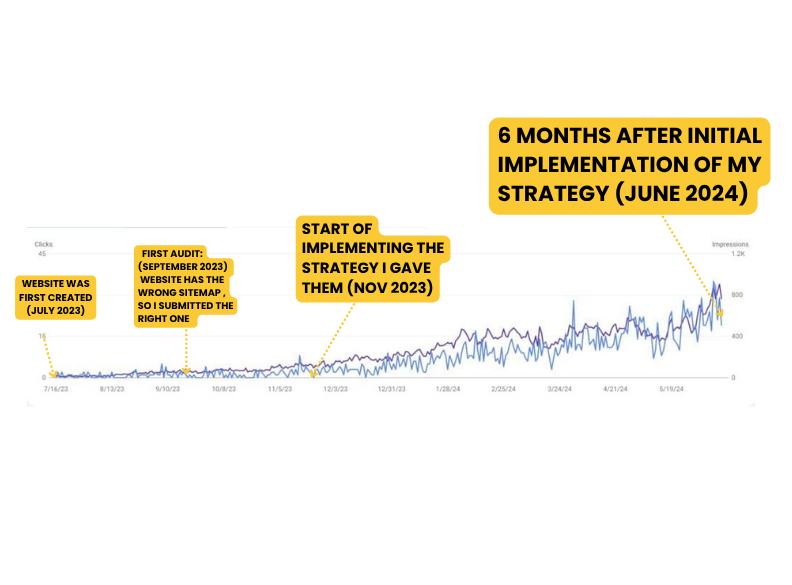
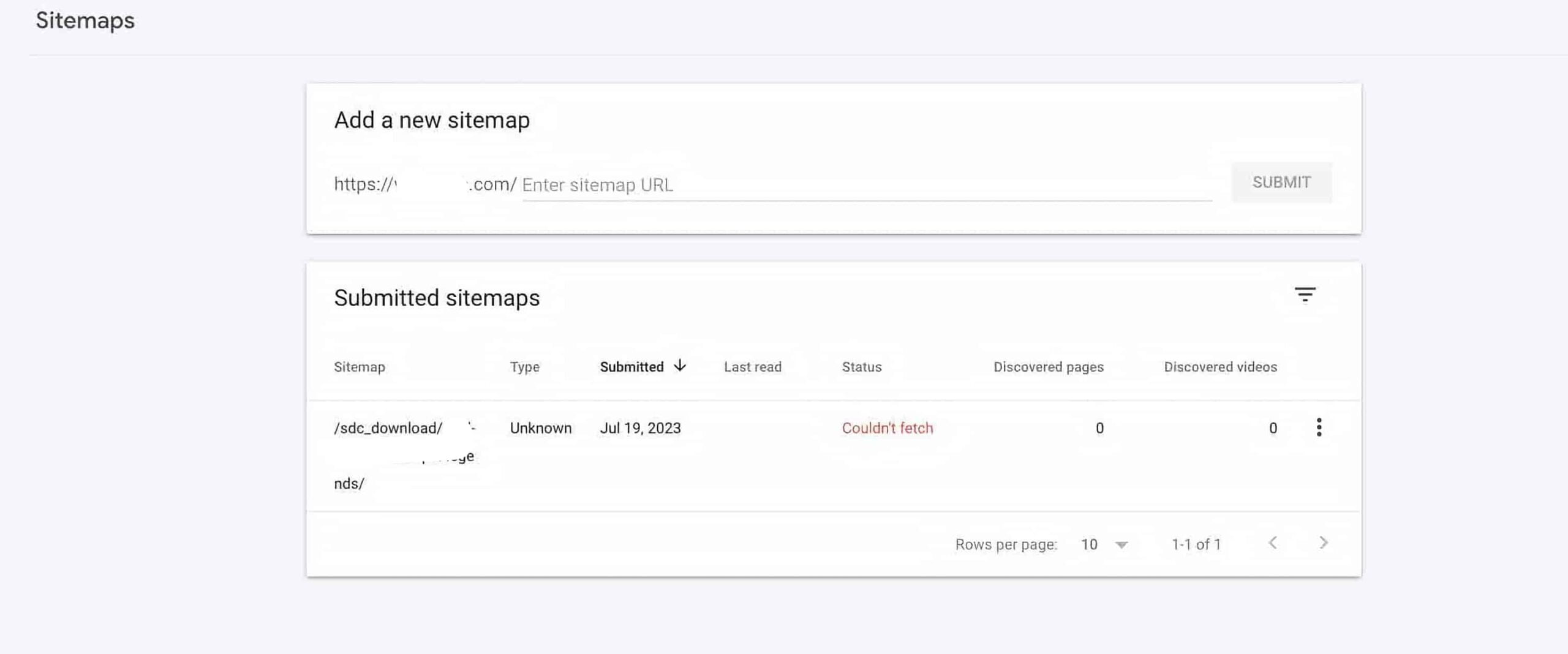
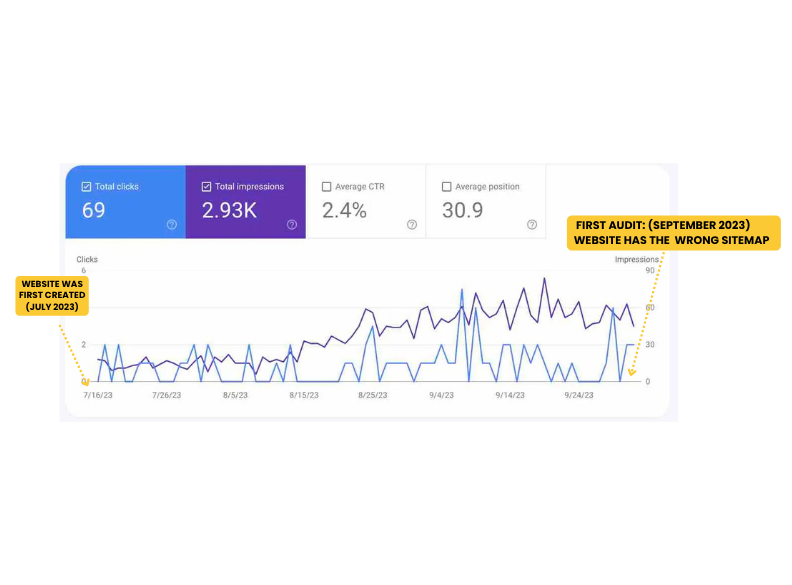
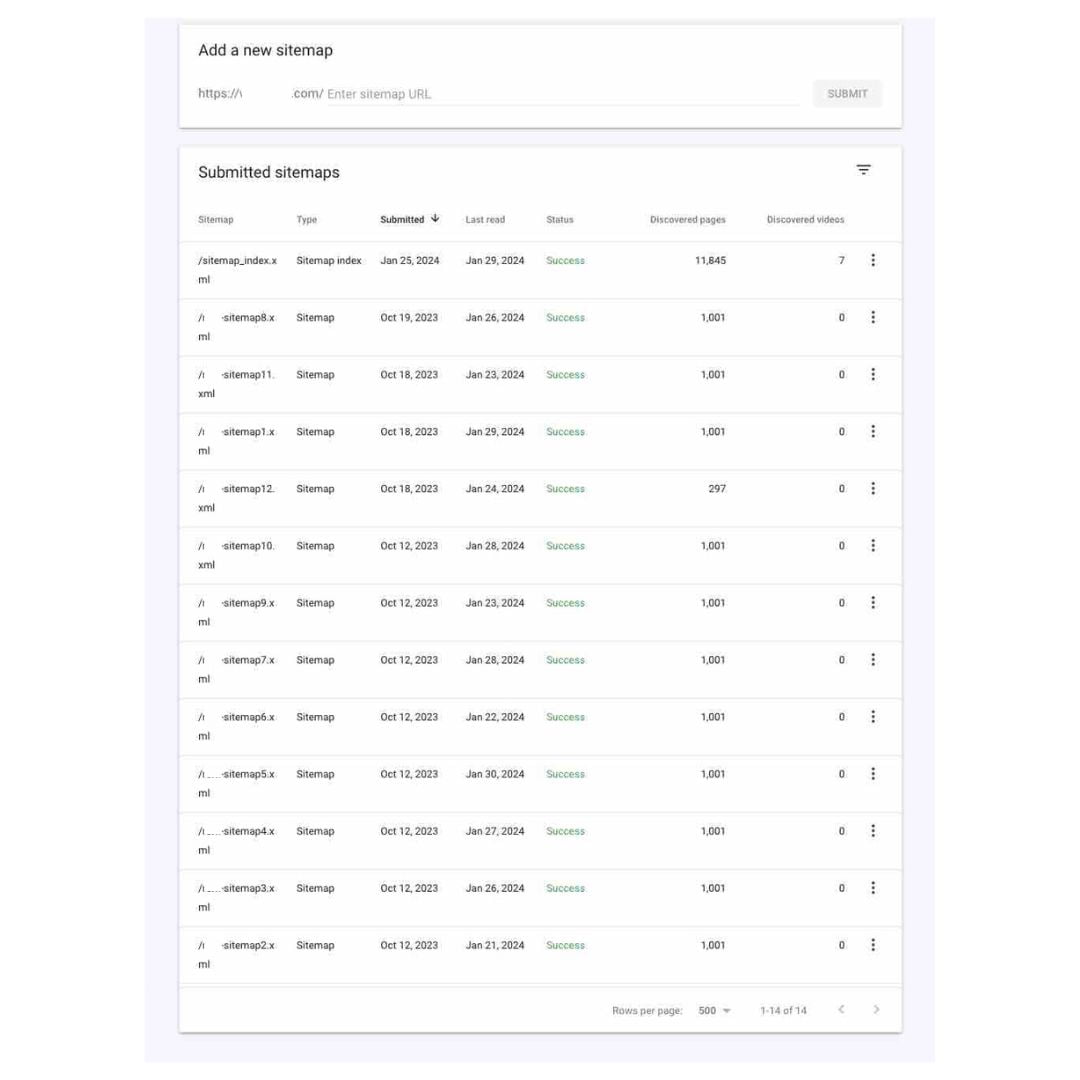
    When I first checked, the site already had 11,000-12,000 pages. The website first went live July of 2023, but when I checked on September of that year here’s the current state of their sitemap on Google Search Console:

    The Impact of the Wrong Sitemap

    • Missed Opportunities: With the wrong sitemap, Google wasn’t able to crawl and index all the pages on the site. This meant that many pages were essentially invisible to searchers.
    • Stagnant Traffic: The site’s clicks and impressions were flatlining. Despite being live for several months, it wasn’t gaining any traction in search results.
    • Wasted Sandbox Period: New websites go through what’s called a “sandbox phase,” which may typically lasts 3-9 months. This is a critical time to build a strong SEO foundation.

      Unfortunately, this site wasn’t taking advantage of it.

    Here’s a snapshot of the site’s performance during this period:

    As you can see, the site was barely getting any clicks or impressions. This is a common issue for new websites that don’t have a proper sitemap in place.

    Imagine you already have more than 10,000 pages, you’d be expecting to getting a ton of traffic right?

    But that was not the case here…

    Now the above was the metric baseline and below if things will improve after the supposed sandbox period (February 2024). The best scenario that we’re looking at will be increased clicks and impressions.

    SO WHAT’S A SAND BOX PERIOD?

    The “Google Sandbox” is a term used in SEO (Search Engine Optimization) to describe an unofficial filter that some believe Google applies to new websites. The “sandbox period” usually lasts from a few weeks to several months (often cited as 3–6 months).

    When starting a new website; It’s more important to focus on getting noticed in search results rather than worrying about getting lots of traffic quickly and ranking for specific terms.

    The main aim should be to publish content regularly to address what your audience wants to know. You should also keep an eye on whether Google is finding and listing your content, and how often it shows up in search results.

    Tracking clicks and impressions can help you see how well you’re doing.

    The Solution

    Fixing the Sitemap and Building a Strategy

    When I took over, the first thing I did was conduct a baseline audit. Here’s what I found:

    No Clear Strategy: The site lacked a cohesive SEO strategy, including keyword research, on-page optimizations, and internal linking.

    Incorrect Sitemap: The site had submitted the wrong sitemap, which meant Google wasn’t crawling all its pages.

    Step 1: Creating the Right Sitemap

    The site had 11,000-12,000 pages, which meant it needed more than one sitemap. Here’s what I did:

    1. Generated Multiple Sitemaps: I created a sitemap index file, which acts as a master list of all the individual sitemaps.
    2. Submitted to Google Search Console: I submitted the correct sitemap index to Google, ensuring all pages were discoverable.
    3. I also submitted all the other sitemaps to keep track of which content were not being crawled.

    Step 2: Implementing On-Page Optimizations

    I also provided the client with a strategy they could implement on their own (for their web developer), including some of the below:

    • Optimizing H1 Tags: Ensuring each page had a clear, keyword-rich H1 tag.
    • Internal Linking: Creating a network of internal links to help Google understand the site’s structure and hierarchy.
    • Creating robot.txt filters to prevent indexing unneeded urls.
    • System for editting alt texts and meta datas

    While the client only implemented two of my recommendations by June 2024 (H1 tags and internal linking), the results were still impressive.

    The Results

    A Turnaround in Performance

    After submitting the correct sitemap and making a few tweaks, the site’s performance started to improve—even before the end of its sandbox period in February 2024. Here’s what changed:

    • Increased Clicks and Impressions: The site began to see consistent clicks and impressions, breaking away from the dreaded zero-click days.
    • Improved Visibility: More pages were being indexed, which meant more opportunities to appear in search results.

    Here’s a look at the site’s progress:

    You can see that even before the supposed end of their sandbox period (February 2024), the site was able veer away from 0 clicks in a day and continues to increase their total impressions in a day.

    While the website still has a lot to improve on its SEO, you can see how a simple submission of the right sitemap and a few tweaks can have a great impact on your website.

    DO I NEED A SITEMAP FOR MY WEBSITE

    By June 2024 ,(image above) the site was performing even better, with steady growth in clicks and impressions. While there’s still room for improvement, the impact of having the right sitemap and a few strategic tweaks is undeniable.

    I believe that if they have followed everything on the strategy I made for them, they could do better but this result is still impressive for a website that is not fully optimized.

    Do I need a sitemap for my website?

    Of course! You need to submit your sitemap to search engines so your pages and content will be discovered and start showing up on the searches.

    If you’re running a new website, here’s the key takeaway: Don’t skip the sitemap. It’s one of the simplest yet most effective ways to ensure your site gets noticed by search engines.

    But remember, a sitemap is just the beginning. To truly succeed, you’ll also need:

    • Quality Content: Publish helpful, engaging content that answers your audience’s questions.
    • Keyword Research: Identify the right keywords to target based on what your audience is searching for.
    • Technical SEO: Ensure your site is fast, mobile-friendly, and free of errors.
    • On-Page Optimization: Use proper headings, meta tags, and internal linking to make your content easy to crawl and understand.

    Let’s Break It Down Why You Need It!

    The question of whether you need a sitemap isn’t always a straightforward yes or no. It depends on the size, structure, and content of your website, as well as how easily search engines like Google can crawl and index your pages.

    Let’s explore this in more detail to help you decide if a sitemap is right for your site.

    How to know if sitemap is a MUST HAVE

    1. Large Sites (500+ Pages)

    If your website is large, with hundreds or even thousands of pages, it can be challenging to ensure that every single page is properly linked and accessible to search engines. Without a sitemap, Googlebot (Google’s web crawler) might miss some pages, especially if they’re buried deep within your site’s structure or aren’t well-linked internally.

    • Why It Helps: A sitemap acts as a master list of all your important pages, ensuring that nothing gets overlooked. It’s like giving Google a treasure map to every corner of your site.
    • Example: E-commerce sites with thousands of product pages or news websites with extensive archives can benefit greatly from a sitemap.

    2. New Sites with Few External Links

    If your website is brand new, it likely doesn’t have many (or any) backlinks pointing to it. Backlinks are one of the primary ways Google discovers new content, so without them, your site might fly under the radar.

    • Why It Helps: A sitemap gives Google a direct path to your content, speeding up the discovery and indexing process. It’s like introducing yourself to Google and saying, “Hey, I’m here, and here’s what I’ve got!”
    • Example: A startup’s website or a personal blog that’s just launched can use a sitemap to get noticed faster.

    3. Sites with Rich Media Content

    If your site features a lot of videos, images, or other multimedia content, a sitemap can help Google understand and index this content more effectively. Google can use the additional metadata in your sitemap to display rich results in search, such as video thumbnails or image carousels.

    • Why It Helps: A sitemap allows you to provide extra details about your media files, such as titles, descriptions, and categories, which can improve their visibility in search results.
    • Example: A photography portfolio, a YouTube channel’s website, or a news site with embedded videos can benefit from a media-specific sitemap.

    4. Sites with Frequently Updated Content

    If your site is constantly being updated with new content—like a blog, news site, or event calendar—a sitemap can help Google keep up with the changes.

    • Why It Helps: By including the <lastmod> tag in your sitemap, you can tell Google when a page was last updated, encouraging it to revisit and reindex the page.
    • Example: A daily news blog or a website for a conference with regularly updated schedules.

    When You Might NOT Need a Sitemap

    1. Small Sites (500 Pages or Fewer)

    If your site is relatively small and all your pages are properly linked, Googlebot can likely crawl and index your site without any issues. In this case, a sitemap might not be necessary.

    • Why It’s Optional: Googlebot is pretty good at following internal links, so if your site is well-structured and easy to navigate, it can find all your important pages on its own.
    • Example: A small business website with just a handful of pages (Home, About, Services, Contact) might not need a sitemap.

    2. Comprehensively Linked Sites

    If every important page on your site is linked from the homepage or other easily accessible pages, Googlebot can find its way around without a sitemap.

    • Why It’s Optional: A sitemap is most useful when there are pages that aren’t easily discoverable through internal linking. If your site’s navigation is solid, a sitemap might be redundant.
    • Example: A blog with a clear menu structure and internal links between posts might not need a sitemap.

    3. Sites with Minimal Media Content

    If your site doesn’t have a lot of videos, images, or other media files, and you’re not trying to optimize for rich results in search, a sitemap might not be as critical.

    • Why It’s Optional: Sitemaps are particularly useful for media-rich sites because they allow you to provide additional metadata. If your site is mostly text-based, Google can index it just fine without a sitemap.
    • Example: A simple brochure website or a text-heavy blog might not need a sitemap.

    Should You Create a Sitemap?

    While a sitemap isn’t always mandatory, it’s generally a good idea to have one. Think of it as an insurance policy for your site’s visibility in search results. Even if your site is small and well-structured, a sitemap can provide peace of mind and ensure that Google has all the information it needs to index your content properly.

    Why not take the extra step to ensure your site is as search-engine-friendly as possible?

    Even if you fall into the “might not need” category, creating a sitemap is a quick and easy process that can only help your site—it certainly won’t hurt.

    A Cautionary Tale

    Having a Sitemap Without a Strategy

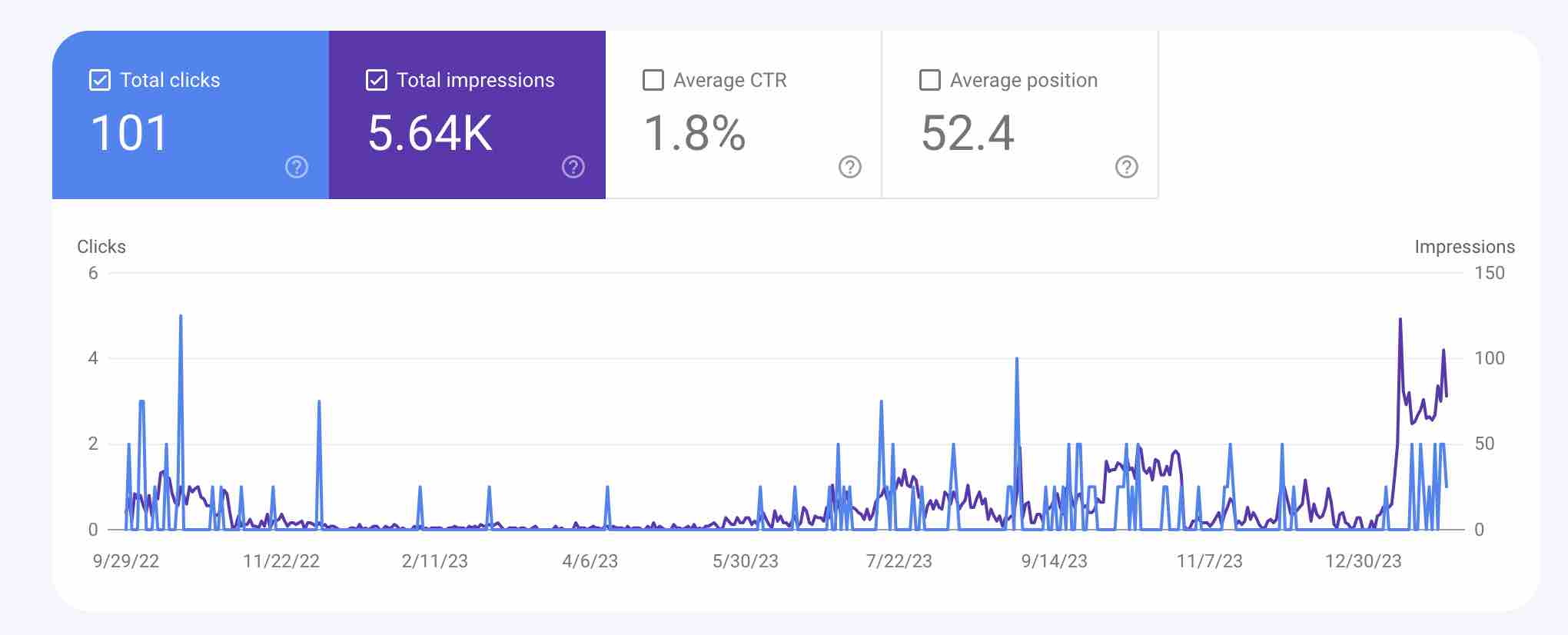
    To drive home the importance of a solid SEO foundation, let’s look at another example. This website was created in September 2022 and had a sitemap submitted correctly. However, it lacked consistent content publishing, keyword research, and technical SEO.

    Here’s what happened:

    As you can see, this other site above never made it out of the sandbox phase. Despite having a sitemap, it failed to gain traction because it didn’t have the other essential elements of a strong SEO strategy.

    Would you rather be never getting out of the sandbox?


    Frequently Asked Questions

    Can you do the same for my website?

    I can help you set up your newly created website on Google Search Console, but it should also include keyword research, technical and on page optimizations.

    You can set up a call/email exchange with me for a free consultation.

    What did you actually do on this project?

    I was responsible for the initial audit, strategic plan for 6 months, on page and technical optimization planning as they have a different team for execution.

    They only wanted me to create a strategy for them.

    Were you in charge of the setup of their Google Search Console account?

    No, they already have set up their GSC account, I only added the right sitemaps. But I also do GSC setup for my clients if needed.

    Read more case studies or articles about on-page SEO and technical SEO. You can also check out my available services:

    Check out all the other SEO case studies and Audits here >>

  • Why My Website Is Not Getting Traffic – Here’s a simple reason

    Why My Website Is Not Getting Traffic – Here’s a simple reason

    We’ve all been there. You’ve poured your heart into creating a beautiful website, filled it with content, and maybe even shared it on social media.

    But despite your efforts, the traffic just isn’t coming. It’s frustrating, right? You’re left wondering, “What am I doing wrong?”

    This case study features an old service-based website created last 2019 with a few content that seems to be ranking some of its pages already , but seems to be getting little to no clicks on most days for years now.

    Here’s the hard truth: the problem might not be your content itself, but the lack of a clear strategy behind it.

    Writing content without a plan is like setting off on a road trip without a map—you might move forward, but you’re unlikely to reach your destination. Let me show you how a content strategy can transform your website’s performance, using a real-life case study as an example.

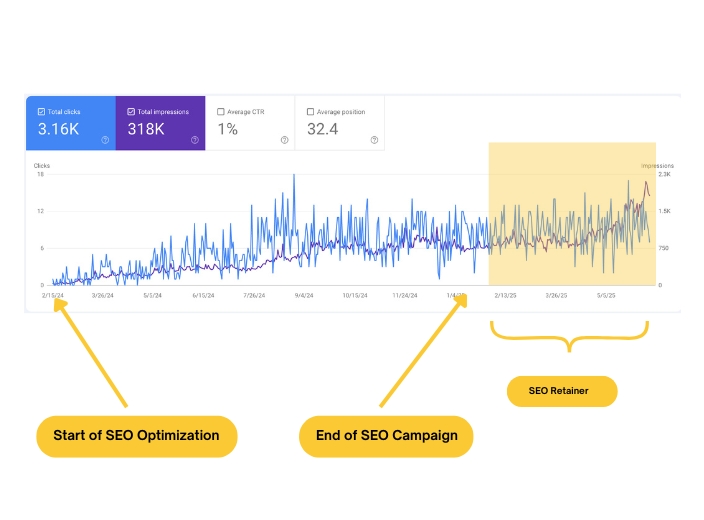
    A Year After

    Did you know that you can resort to having retainer SEO work after and still get good results?

    Just before we jump to the details, here’s are the June 2025 updates on the site:

    June 2025 Update

    The Challenge

    A Stagnant Website

    One of my clients came to me with a service-based website they’d launched back in 2019. Over the years, they’d published a handful of blog posts, and some of their pages were ranking for certain keywords.

    But despite this, their traffic was minimal—some days, they’d get little to no clicks at all. After five years, they realized something needed to change.

    Here’s what their website looked like before we started working together:

    • No Google Search Console Profile: They’d never set one up, which meant they had no way to track their performance or identify issues.
    • Low Traffic: Despite having some ranking pages, their overall traffic was stagnant.
    • No Clear Strategy: Their content was scattered, with no clear focus or alignment with their business goals.

    Their primary objectives were:

    1. To rank for location-based keywords.
    2. To target a specific niche keyword.
    3. To create an ebook and launch an email campaign.

    The following are the website’s metrics before the optimization.

    For 5 years, they never created a Google Search Console profile so it was the first thing I did while doing the website audit.

    The Challenge for getting  more traffic to your website

    The client came to me to ask for help on getting traffic for their business objective and to create an ebook for them and help them on their planned email campaign.

    Their primary objective is to show up for location and a specific niche keyword.

    Why a Content Strategy is a Game-Changer

    A content strategy isn’t just about writing more blog posts or posting on social media. It’s about creating a roadmap that aligns your content with your audience’s needs and your business goals. Here’s why it’s so powerful:

    1. Know Your Audience: A strategy helps you understand who you’re talking to. Instead of guessing what your audience wants, you can create content that speaks directly to their pain points and interests.
    2. SEO Optimization: A good strategy ensures your content is optimized for search engines. This means using the right keywords, structuring your pages correctly, and making it easy for Google to understand what your site is about.
    3. Consistency: Posting regularly keeps your audience engaged and coming back for more. A strategy helps you plan and maintain a consistent publishing schedule.
    4. Alignment with Goals: Whether you’re looking to drive sales, generate leads, or build brand awareness, a strategy ensures your content supports these objectives.

    The Risks of Flying Blind

    When you create content without a strategy, you’re essentially shooting in the dark. Here’s what can go wrong:

    • Missing the Mark: Without understanding your audience, you might end up writing content that doesn’t resonate with them.
    • Inconsistency: Posting sporadically confuses your audience and makes it harder to build a loyal following.
    • Poor SEO: If your content isn’t optimized, search engines won’t rank it, and potential visitors won’t find it.
    • Lack of Direction: Without a clear plan, your content can feel disjointed and fail to build momentum.

    The Solution

    A Comprehensive Content Strategy

    To turn things around for my client, I started with a thorough website audit. Here’s what we uncovered and how we addressed it:

    1. Technical and On-Page Optimizations: The website needed several fixes, including improving site speed, fixing broken links, and optimizing meta tags.
    2. Keyword Realignment: Many of the existing pages were targeting the wrong keywords. We conducted intensive keyword research to identify the best opportunities for their niche and location-based goals.
    3. Content Updates: The blog posts that were already ranking needed updates to make them more helpful and relevant to readers.
    4. New Content Creation: Using the insights from our keyword research, we created new blog posts, location pages, and an ebook designed to attract their target audience.

    The Results

    Dramatic Improvement

    Within just four months, the website’s performance improved significantly. Here’s what changed:

    Higher Engagement: The updated and new content resonated with readers, leading to longer time on site and lower bounce rates.

    More Keywords Ranking: The number of keywords the site ranked for increased dramatically, as shown in Ahrefs.

    Increased Organic Traffic: Google Search Console data confirmed a steady rise in organic traffic and impressions.

    What This Means for You

    Imagine what your website could achieve with a solid content strategy in place. Over five years, the difference between a strategy-driven approach and winging it could be massive. Here’s what you can take away from this case study:

    Be Consistent: Regular updates and new content keep your audience engaged and help you build authority in your niche.

    Start with a Plan: A content strategy gives you direction and ensures every piece of content you create serves a purpose.

    Optimize for SEO: Technical and on-page SEO are essential for making your site visible to search engines.

    Create Helpful Content: Focus on creating content that solves problems and answers questions for your audience.

    Here’s to Getting More Traffic To Your Website

    So the what can we take from this… well, I guess today is never too late to start getting a plan for your website.

    Getting more traffic to your website should not only rely on links shared on your social media. The key to make it sustainable is to have organic traffic that you can only get when you have a solid technical structure, on page SEO optimization every now and then, and creating helpful content guided by a keyword strategy.


    Frequently Asked Questions

    Can you do the same for my website?

    Yes your website could rank with my strategy, but not every website could get the same result in 4 months as my content strategy is not just about creating content but also includes optimizing the website to have a web structure with a good technical SEO and keyword map in mind and sometimes it takes longer specially when there are a lot of pages and fixes needed.


    You can set up a call/email exchange with me for a free consultation.

    What did you actually do on this project?

    I did everything from initial audit, monitoring, on page, and technical SEO optimizations on WordPress , keyword research, content creation and content strategy.

    My campaign for them is not over yet since ranking the website is just the first phase of it there are more to be done for their campaign.

    Which package did they get?

    They chose the Custom package since they were only willing to work on a budget and had other goals than just SEO. Since this is the case, the implementation timeline was beyond 6 months and inclusions of the project varies.

    For example, they did not include Offpage SEO, but eventually with the quality content produced they were able to get organic backlinks from relevant websites from their niche.

    Read more case studies or articles about on-page SEO and technical SEO. You can also check out my available services:

  • How Important Are Backlinks To SEO? It Depends.

    How Important Are Backlinks To SEO? It Depends.

    How Important Are Backlinks To SEO? Truth is, it depends.

    While backlinks can significantly boost your website’s visibility and rankings, they’re not the only factor that matters. In this detailed case study, we’ll dive deep into the actual impact of backlinks on search engine rankings and explore whether the conventional wisdom of “more backlinks = higher rankings” holds true.

    The Challenge

    Declining Backlinks and SEO Performance

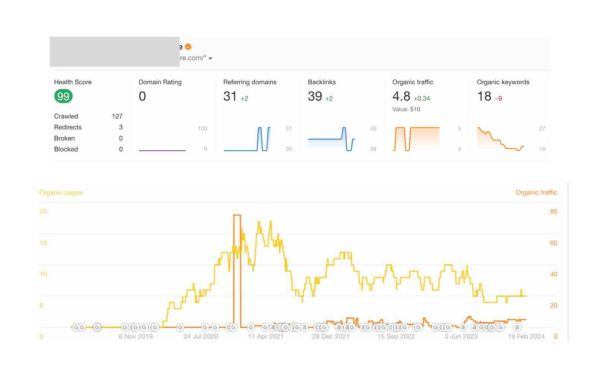
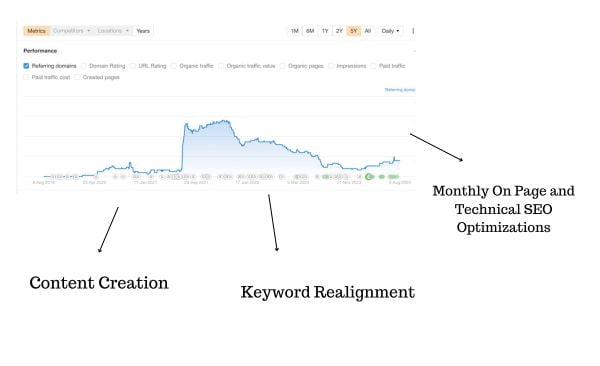
    Imagine this scenario: Your website has been steadily losing referring domains and backlinks over the past year. This decline raises a critical question—do the number and quality of backlinks really have a significant impact on your site’s SEO performance?

    Do backlinks really matter?

    To answer this, let’s look at a real-world example. The graph above (from Ahrefs) shows the number of referring domains—websites that linked to a page on the client’s site or just the same that refers to backlinks. Some of these domains may have provided just one backlink, while others may have linked multiple times.

    Many SEO specialists would see this decline and immediately recommend a backlink-building strategy, often charging a premium for their services. And to be fair, acquiring backlinks is hard work—it requires outreach, relationship-building, and sometimes even financial investment.

    But here’s the catch: not all backlinks are created equal. A single high-quality backlink from a reputable, authoritative site can be far more valuable than hundreds of low-quality links from spammy or irrelevant domains.

    This brings us to two key questions:

    1. How do we determine if a backlink is high-quality?
    2. Are backlinks the only thing you need for SEO success?

    We’ll come back to these questions later in the case study, but first, let’s talk about the solution we implemented for this client.

    The Solution

    A Content-First Approach

    When I first audited this website in February 2024, I noticed something interesting. Despite having a decent number of backlinks, the site wasn’t ranking well for its target keywords. This led me to propose a strategy focused on content creation, keyword realignment, and monthly on-page and technical optimizations.

    You might be wondering: Why didn’t I recommend off-page optimizations (like backlink building) right away? 

    The answer lies in the results I achieved below.

    The Results

    Content Outperformed Backlinks

    After implementing the content-first strategy, the website saw significant improvements in keyword rankings and organic traffic—without focusing on acquiring more backlinks.

    Here’s what happened:

    As you can see even though the website had a number of backlinks for years, it did not drive the website to gain keywords and help it show up on Google Searches. While we cannot discard the importance of backlinks, it should be a second level strategy after consistently ranking on Google Search.

    Keyword Rankings Improved: By aligning content with the right keywords and optimizing on-page elements, the site started ranking for more relevant search terms.

    Organic Traffic Increased: As the site climbed the rankings, it began attracting more visitors from Google searches.

    User Engagement Rose: High-quality content kept visitors on the site longer, reducing bounce rates and improving overall engagement.

    The takeaway? Even though the website had a decent number of backlinks, those links alone weren’t enough to drive meaningful results. 

    Content was the game-changer.


    As an SEO specialist working for 4 years now, I know that while backlinks are important, content should be the first priority since content is like the backbone that amplify the effect of the backlinks.


    THROUGH THIS CASE STUDY, ONCE AGAIN, WE PROVED THAT QUALITY CONTENT IS A GREAT DRIVER OF TRAFFIC AND ONLINE VISIBILITY THAN BACKLINKS.

    The lessons from this case study are clear: while backlinks are still a vital part of SEO, they shouldn’t overshadow the importance of content.

    Adopting a content-first strategy for not yet ranking website can help build the foundation before harvesting the benefits of backlinks but also builds a strong foundation for sustained SEO success and better user engagement.

    Why Content Should Be Your First Priority

    • Content is the Foundation: Think of your website as a house. Backlinks are like the decorations—they make it look good, but they won’t hold up the structure.

      Content, on the other hand, is the foundation. Without high-quality, relevant, and engaging content, even the best backlinks won’t get you far.

      Search engines love content that meets what users are looking for, as it leads to better user engagement and higher rankings.
    • Content Attracts Natural Backlinks: Great content pulls in backlinks effortlessly. When your site offers real value and credibility, other sites are naturally inclined to link to you.

      By focusing on crafting high-quality content, you’re more likely to engage in organic link-building. This natural link-building is not only more sustainable but also more effective than forced or paid backlinks.
    • Content Ensures Long-Term SEO Health: Search engines like Google are constantly updating their algorithms to prioritize high-quality content.

      Google and other search engines are continually refining their algorithms to favor relevant and high-quality content. If your site consistently offers fresh and engaging content, it’s more equipped to handle changes in SEO algorithms and maintain or even boost its ranking.

    • Content Boosts User Experience: Great content keeps visitors engaged, reduces bounce rates, and increases the likelihood of conversions—all of which are key ranking factors.

    So, How Important Are Backlinks to SEO?

    The answer depends on where your website stands.

    • If you don’t already have ranking content, acquiring backlinks will only give you a small boost.
    • But if you’ve got solid content that’s already ranking and you’re looking to outrank competitors, quality backlinks can make all the difference.

    What Makes a Backlink High-Quality?

    Quality backlinks are vital for effective SEO as they improve a website’s search rankings and enhance its credibility.

    Not all backlinks are created equal. Here’s what to look for in a quality backlink:

    • High Domain Authority: Links from authoritative sites carry more weight.
    • Relevance: The linking site should be relevant to your niche or industry.
    • Contextual Integration: The link should be naturally placed within relevant content.
    • Dofollow Attribute: This allows the link to pass “link equity” to your site.
    • Traffic and Trustworthiness: Links from sites with high traffic and low spam scores are ideal.

    Acquiring these backlinks often involves creating exceptional content, conducting targeted outreach, and building relationships within your industry.


    Frequently Asked Questions

    Can you do the same for my website?

    Yes I can create a strategy for you that is customized for your website need and target outcome. Implementation time may vary in time depending on your budget and results are also variable due to the different competitiveness of different business niches.

    You can set up a call/email exchange with me for a free consultation.

    What did you actually do on this project?

    I did everything from initial audit, monitoring, on page, and technical SEO optimizations on WordPress , keyword research, and content strategy.

    The content creation was done by their writer and I only guided them with my keyword research.

    Which package did they get?

    They chose the Custom package since they have their own writer and they plan to implement an SEO strategy for one year.

    Read more case studies or articles about on-page SEO and technical SEO. You can also check out my available services:

  • How to create a Sitemap for Google Search Console

    How to create a Sitemap for Google Search Console

    What is a Sitemap?

    A sitemap is an XML, RSS, or text file that outlines the structure of your website by listing the URLs of all the individual pages. It acts as a roadmap for search engines, allowing them to quickly find and index all the important content on your site.

    This is particularly crucial for large websites with numerous pages that might not be discoverable via regular browsing.

    A sitemap can also include metadata about each URL, such as when it was last updated, how often it changes, and its importance relative to other pages, which helps search engines crawl your site more intelligently.

    Types of Content in a Sitemap

    Video Content

    For video content, a sitemap can include specific tags such as <video:video> which encase further details like <video:title>, <video:description>, and <video:duration>.

    For example, a video sitemap entry might look like this:

    <video:video>
      <video:content_loc>http://www.example.com/video123.flv</video:content_loc>
      <video:title>How to install a solar panel</video:title>
      <video:description>This video demonstrates the step-by-step solar panel installation</video:description>
      <video:duration>600</video:duration>
      <video:rating>4.5</video:rating>
    </video:video>

    This detailed structuring helps search engines understand and appropriately index and present video content in search results, potentially increasing the reach and views of the content.

    Image Content

    An image sitemap might include location, caption, title, and license information. For instance:

    <image:image>
      <image:loc>http://www.example.com/image.jpg</image:loc>
      <image:caption>Solar eclipse as seen from the park</image:caption>
      <image:title>Solar Eclipse</image:title>
      <image:license>http://www.example.com/license</image:license>
    </image:image>
    

    News Content

    A news sitemap is pivotal for websites publishing timely content. It helps news articles appear more prominently in search engine news sections, potentially driving higher traffic during peak interest times. An example entry would be:

    <news:news>
      <news:publication>
        <news:name>Example Daily</news:name>
        <news:language>en</news:language>
      </news:publication>
      <news:publication_date>2025-02-10</news:publication_date>
      <news:title>Local Elections 2025: Key Takeaways</news:title>
    </news:news>

    If you’re using a content management system (CMS) like WordPress, Wix, or Blogger, it’s likely your CMS has already created a sitemap for you, so you might not need to take further action.

    How to Create an XML Sitemap

    Creating an XML sitemap might sound technical, but it’s easier than you think. Here are a few methods to create one:

    1. Use a Sitemap Generator Tool

    There are plenty of free and paid tools online that can automatically generate a sitemap for you. Some popular options include:

    • XML-Sitemaps.com: A free tool for smaller sites (up to 500 pages).
    • Screaming Frog SEO Spider: A desktop tool for larger sites (free for up to 500 URLs).
    • Yoast SEO (for WordPress): If you’re using WordPress, the Yoast plugin can automatically generate and update your sitemap.

    2. Manually Create a Sitemap

    If you’re comfortable with coding, you can create a sitemap manually. Here’s a basic example of what an XML sitemap looks like:

    <?xml version="1.0" encoding="UTF-8"?>
    <urlset xmlns="http://www.sitemaps.org/schemas/sitemap/0.9">
       <url>
          <loc>https://www.example.com/</loc>
          <lastmod>2023-10-01</lastmod>
          <changefreq>weekly</changefreq>
          <priority>1.0</priority>
       </url>
       <url>
          <loc>https://www.example.com/about</loc>
          <lastmod>2023-09-15</lastmod>
          <changefreq>monthly</changefreq>
          <priority>0.8</priority>
       </url>
    </urlset>

    Where:

    • <loc>: The URL of the page.
    • <lastmod>: The date the page was last modified.
    • <changefreq>: How often the page is updated (e.g., daily, weekly, monthly).
    • <priority>: The importance of the page relative to other pages on your site (ranges from 0.0 to 1.0).

    3. Use Your CMS or Website Builder

    Many content management systems (CMS) like WordPress, Wix, and Shopify automatically generate sitemaps for you. For example:

    • WordPress: If you’re using Yoast SEO or Rank Math, your sitemap is usually located at https://yourwebsite.com/sitemap_index.xml.
    • Wix: Your sitemap is automatically created and can be found at https://yourwebsite.com/sitemap.xml.
    • Shopify: Your sitemap is located at https://yourstore.com/sitemap.xml.

    Do I Need a Sitemap?

    When You Might Need a Sitemap

    • Large Sites: It’s harder to ensure every page is linked on a large site, making a sitemap beneficial.
    • New Sites: New sites with few external links might not be discovered by Googlebot.
    • Rich Media Content: Sites with a lot of videos, images, or news content benefit from a sitemap as Google can take additional information into account for Search.

    When You Might Not Need a Sitemap

    • Small Sites: If your site has about 500 pages or fewer, and all pages are properly linked, you might not need a sitemap.
    • Comprehensively Linked Sites: If Googlebot can find all important pages by following links from the homepage.
    • Minimal Media Content: If you don’t have many media files or news pages you want to show in search results.

    Here’s an in depth case study on why you still need a sitemap even if your website falls under “When You Might Not Need a Sitemap”.

    Building a Sitemap

    Choosing the Right Format

    Google supports several sitemap formats, each with its own benefits and drawbacks:

    1. XML Sitemaps: The most versatile, can provide extensive information about your URLs.
      • Pros: Extensible, versatile, widely supported by CMS plugins.
      • Cons: Can be complex to maintain, especially for large sites.
    2. RSS, mRSS, and Atom 1.0: Easy to create, particularly for video content.
      • Pros: Automatically generated by most CMS.
      • Cons: Limited to videos, cannot provide information about images or news.
    3. Text Sitemaps: Simple format, lists URLs to HTML and other indexable pages.
      • Pros: Easy to create and maintain.
      • Cons: Limited to HTML content.

    Best Practices for Sitemaps

    • Size Limits: A single sitemap should be no larger than 50MB (uncompressed) and contain no more than 50,000 URLs. If necessary, break it into multiple sitemaps and use a sitemap index file.
    • Encoding and Location: The sitemap file must be UTF-8 encoded and can be hosted anywhere on your site. However, it should preferably be at the site root to affect all files.
    • URLs: Use fully-qualified, absolute URLs in your sitemaps. For instance, use https://www.example.com/mypage.html instead of /mypage.html.

    How to create a Sitemap for Google Search Console

    1. CMS-Generated Sitemaps: Most CMS like WordPress, Wix, and Blogger automatically generate sitemaps. Check your CMS documentation for details.
    2. Manual Creation: For small sites, you can create a sitemap manually using a text editor.
    3. Automatic Generation: For larger sites, use tools or plugins to generate sitemaps. Talk to your developers about creating scripts to extract URLs from your database.

    Example of a Basic XML Sitemap

    <?xml version="1.0" encoding="UTF-8"?>
    <urlset xmlns="http://www.sitemaps.org/schemas/sitemap/0.9">
      <url>
        <loc>https://www.example.com/foo.html</loc>
        <lastmod>2022-06-04</lastmod>
      </url>
    </urlset>
    

    Generating Sitemap for Different CMS

    If you’re using a content management system (CMS) like Wix, Squarespace, or Magento, you’re in luck! These platforms make it relatively easy to generate and manage sitemaps, even if you’re not a tech expert. Below, we’ll dive into the specifics of how to generate and submit a sitemap for each of these popular CMS platforms.

    • WordPress
    • Squarespace
    • Wix
    • Magento
    • Drupal
    • Shopify

    Generating a Sitemap on Squarespace

    Squarespace is known for its user-friendly interface and seamless integration of essential SEO tools, including automatic sitemap generation. Here’s how to access and submit your sitemap:

    Step 1: Find Your Sitemap URL

    1. Log in to Your Squarespace Account: Go to your Squarespace dashboard and select the website you’re working on.
    2. Locate Your Sitemap: Squarespace automatically generates a sitemap for your site. The URL typically follows this format: https://yourwebsite.com/sitemap.xml.
      • For example, if your site is www.myblog.com, your sitemap will be www.myblog.com/sitemap.xml.
    3. Verify Your Sitemap: You can check if your sitemap is working by entering the URL into your browser. It should display a list of your site’s URLs in XML format.

    Step 2: Submit Your Sitemap to Google

    1. Go to Google Search Console: Log in to your Google Search Console account and select the property (website) you want to submit the sitemap for.
    2. Navigate to the Sitemaps Section: In the left-hand menu, click on “Sitemaps” under the “Index” section.
    3. Submit Your Sitemap: In the “Add a new sitemap” field, enter sitemap.xml and click “Submit”.
    4. Monitor the Status: Google will start processing your sitemap. You can check the status in the Search Console to ensure there are no errors.

    Pro Tip: Squarespace automatically updates your sitemap whenever you add or remove pages, so you don’t need to worry about manually updating it.

    Generating a Sitemap on Wix

    Wix is another beginner-friendly platform that takes care of sitemap generation for you. Here’s how to access and submit your sitemap:

    Step 1: Find Your Sitemap URL

    1. Log in to Your Wix Account: Access your Wix dashboard and select the site you’re working on.
    2. Locate Your Sitemap: Wix automatically generates a sitemap for your site. The URL will look like this: https://yourwebsite.com/sitemap.xml.
      • For example, if your site is www.mystore.com, your sitemap will be www.mystore.com/sitemap.xml.
    3. Verify Your Sitemap: Enter the sitemap URL into your browser to confirm it’s working. You should see an XML file listing your site’s URLs.

    Step 2: Submit Your Sitemap to Google

    1. Go to Google Search Console: Log in to your Google Search Console account and select the relevant property.
    2. Navigate to the Sitemaps Section: Click on “Sitemaps” in the left-hand menu.
    3. Submit Your Sitemap: Enter sitemap.xml in the “Add a new sitemap” field and click “Submit”.
    4. Monitor the Status: Keep an eye on the status in Google Search Console to ensure everything is processed correctly.

    Pro Tip: Wix automatically updates your sitemap whenever you make changes to your site, so you don’t need to manually regenerate it.

    Generating a Sitemap on Magento

    Magento is a more advanced CMS, often used for e-commerce websites. While it requires a bit more technical know-how, generating and submitting a sitemap is still straightforward. Here’s how to do it:

    Step 1: Generate Your Sitemap in Magento

    1. Log in to Your Magento Admin Panel: Access the backend of your Magento site.
    2. Navigate to the Sitemap Section: Go to Marketing > Site Map.
    3. Create a New Sitemap:
      • Click Add Sitemap.
      • Fill in the required fields, such as the filename (e.g., sitemap.xml) and path.
      • Set the frequency and priority for your pages. For example:
        • Blog posts: Set to daily.
        • Product pages: Set to weekly.
        • Static pages (e.g., About Us): Set to monthly.
      • Click Save & Generate to create your sitemap.
    4. Verify Your Sitemap: Once generated, your sitemap URL will look something like this: https://yourwebsite.com/sitemap.xml. You can check it by entering the URL into your browser.

    Step 2: Submit Your Sitemap to Google

    1. Go to Google Search Console: Log in to your Google Search Console account and select the relevant property.
    2. Navigate to the Sitemaps Section: Click on “Sitemaps” in the left-hand menu.
    3. Submit Your Sitemap: Enter sitemap.xml in the “Add a new sitemap” field and click “Submit”.
    4. Monitor the Status: Check the status in Google Search Console to ensure there are no errors.

    Pro Tip: Magento allows you to schedule sitemap generation, so you can set it to update automatically at regular intervals (e.g., daily or weekly). This is especially useful for e-commerce sites with frequently changing inventory.

    Generating a Sitemap on Drupal

    Drupal is a powerful and flexible CMS, often used for complex websites. While it doesn’t generate sitemaps automatically out of the box, you can easily add this functionality using modules. Here’s how to do it:

    Step 1: Install the XML Sitemap Module

    1. Log in to Your Drupal Admin Panel: Access the backend of your Drupal site.
    2. Download and Install the Module:
      • Go to the Extend section in the admin menu.
      • Search for the XML Sitemap module (or use the Simple XML Sitemap module for Drupal 8/9/10).
      • Download and install the module.
    3. Enable the Module: Once installed, enable the module by checking the box next to it and clicking Install.

    Step 2: Configure the XML Sitemap Module

    1. Navigate to the Configuration Page: Go to Configuration > Search and Metadata > XML Sitemap.
    2. Set Up Your Sitemap:
      • Configure the settings for your sitemap, such as which content types, taxonomies, and custom links to include.
      • Set the update frequency and priority for different types of content (e.g., blog posts, product pages).
    3. Generate Your Sitemap: Click Save Configuration to generate your sitemap.

    Step 3: Find Your Sitemap URL

    1. Locate Your Sitemap: Once generated, your sitemap URL will typically look like this: https://yourwebsite.com/sitemap.xml.
    2. Verify Your Sitemap: Enter the URL into your browser to confirm it’s working. You should see an XML file listing your site’s URLs.

    Step 4: Submit Your Sitemap to Google

    1. Go to Google Search Console: Log in to your Google Search Console account and select the relevant property.
    2. Navigate to the Sitemaps Section: Click on “Sitemaps” in the left-hand menu.
    3. Submit Your Sitemap: Enter sitemap.xml in the “Add a new sitemap” field and click “Submit”.
    4. Monitor the Status: Check the status in Google Search Console to ensure there are no errors.

    Pro Tip: The XML Sitemap module allows you to schedule automatic updates, so your sitemap stays current without manual intervention.

    Generating and Submitting a Sitemap on Shopify

    Shopify is a popular e-commerce platform that simplifies sitemap generation for online stores. Here’s how to access and submit your sitemap:

    Step 1: Find Your Sitemap URL

    1. Log in to Your Shopify Admin Panel: Access the backend of your Shopify store.
    2. Locate Your Sitemap: Shopify automatically generates a sitemap for your store. The URL will look like this: https://yourstore.com/sitemap.xml.
      • For example, if your store is www.myshop.com, your sitemap will be www.myshop.com/sitemap.xml.
    3. Verify Your Sitemap: Enter the sitemap URL into your browser to confirm it’s working. You should see an XML file listing your store’s URLs.

    Step 2: Submit Your Sitemap to Google

    1. Go to Google Search Console: Log in to your Google Search Console account and select the relevant property.
    2. Navigate to the Sitemaps Section: Click on “Sitemaps” in the left-hand menu.
    3. Submit Your Sitemap: Enter sitemap.xml in the “Add a new sitemap” field and click “Submit”.
    4. Monitor the Status: Keep an eye on the status in Google Search Console to ensure everything is processed correctly.

    Pro Tip: Shopify automatically updates your sitemap whenever you add or remove products, collections, or pages, so you don’t need to manually regenerate it.

    Key Takeaways for Each CMS

    • Squarespace: Fully automated sitemap generation. Just submit sitemap.xml to Google Search Console, and Squarespace handles the rest.
    • Wix: Also fully automated. Your sitemap is always up-to-date, and you only need to submit sitemap.xml to Google.
    • Magento: Requires manual setup but offers advanced customization options, such as setting update frequencies and priorities. Ideal for large e-commerce sites.
    • Drupal: Requires the installation of a module (e.g., XML Sitemap or Simple XML Sitemap) but offers advanced customization options for large or complex sites.
    • Shopify: Fully automated sitemap generation. Just submit sitemap.xml to Google Search Console, and Shopify handles the rest.

    Why Sitemaps Matter for These CMS Platforms

    Regardless of which CMS you’re using, a sitemap is a crucial tool for ensuring your site is fully indexed by Google. Here’s why it’s especially important for these platforms:

    Media-Rich Sites (Wix, Squarespace): Ensures images, videos, and other media are properly indexed for rich search results.

    E-commerce Sites (Magento): With thousands of product pages, a sitemap ensures nothing gets missed.

    Blogs and Portfolios (Squarespace, Wix): Helps Google index new posts or projects quickly.

    Drupal:

    • Complex Sites: Drupal is often used for large, complex websites with thousands of pages. A sitemap ensures that all pages are discoverable by search engines.
    • Custom Content Types: Drupal’s flexibility allows for custom content types, which can be included in the sitemap for better indexing.

    Shopify:

    E-commerce Sites: With constantly changing inventory, a sitemap ensures that new products and collections are indexed quickly.

    SEO for Product Pages: A sitemap helps Google find and rank individual product pages, which is crucial for driving traffic to your store.

    Whether you’re using Squarespace, Wix, or Magento, generating and submitting a sitemap is a simple yet powerful way to improve your site’s visibility in search results. Each platform has its own unique process, but the end goal is the same: to make it as easy as possible for Google to find and index your content.

    So, take a few minutes to locate your sitemap, submit it to Google Search Console, and enjoy the peace of mind that comes with knowing your site is fully optimized for search engines.

    Submitting Your Sitemap to Google

    Submitting a sitemap helps Google find your URLs, but it doesn’t guarantee all will be crawled. Here’s how to submit your sitemap:

    1. Search Console: Use the Sitemaps report to submit your sitemap URL.
    2. API: Programmatically submit your sitemap using the Search Console API.
    3. robots.txt: Add a line in your robots.txt file specifying the path to your sitemap, e.g., Sitemap: https://example.com/my_sitemap.xml.

    Troubleshooting Sitemaps on Google Search Console

    Use Google Search Console to manage and troubleshoot sitemaps. The Sitemaps report provides details on submission history and any errors encountered. Here are common issues and solutions:

    • Fetch Errors: Ensure the sitemap URL is correct and accessible. Check for robots.txt restrictions or manual actions.
    • Parsing Errors: Ensure your sitemap follows the correct format and syntax.
    • Size Issues: If your sitemap is too large, break it into smaller sitemaps.

    Having a sitemap is crucial for SEO, but ensuring it’s functioning correctly is equally important. Google Search Console provides various tools and reports to help you troubleshoot any issues with your sitemap. Here’s a detailed guide on how to troubleshoot sitemaps using Google Search Console.

    Accessing the Sitemaps Report

    To get started with troubleshooting your sitemap, follow these steps:

    1. Log into Google Search Console: Use your Google account to access your Search Console dashboard.
    2. Navigate to the Sitemaps Report: On the left-hand menu, click on “Sitemaps” under the “Index” section. This will display all the sitemaps you have submitted.

    Common Sitemap Issues and How to Fix Them

    If you manage a website, you know how crucial sitemaps are for SEO. They guide search engines through your site’s content, ensuring that all your pages get indexed properly. However, issues can arise that prevent sitemaps from functioning correctly. Here’s an in-depth look at some common sitemap problems and how to fix them.

    1. Couldn’t Fetch Sitemap

    Google can’t retrieve the sitemap file from your server, leading to this error.

    Common Causes:

    • The sitemap URL may be incorrect.
    • Your robots.txt file might be blocking access to the sitemap.
    • Manual actions or security measures could be restricting Google’s access.
    • Potential server issues like downtime or misconfigurations.

    Solutions:

    • Verify Sitemap URL: Make sure that the URL provided in the Google Search Console is correct and leads directly to the sitemap file. Test the URL in a web browser to ensure it downloads the sitemap.
    • Check robots.txt: Open your robots.txt file and ensure there are no Disallow: entries blocking the sitemap URL. If necessary, add Allow: /sitemap_location to explicitly allow access.
    • Resolve Manual Actions: In Google Search Console, navigate to the ‘Security & Manual Actions’ section to see if there are any penalties affecting your site’s access. Follow Google’s guidelines to resolve these issues.
    • Server Configuration: Ensure your web server is properly configured to serve the sitemap. Check server logs for any errors and make sure the server is running with adequate uptime.

    2. Sitemap Parsing Errors

    Google encountered errors trying to read the sitemap.

    Common Causes:

    • Errors in XML syntax within the sitemap file.
    • Unescaped characters disrupting XML parsing.

    Solutions:

    • XML Validation: Use online tools like the XML Sitemap Validator to check for syntax errors. This will highlight issues like unclosed tags, missing quotes, or illegal characters.
    • Character Escaping: Ensure that characters like ampersands (&), quotes (‘ or “), and less than (<) or greater than (>) symbols are properly escaped in the XML. For example, use &amp; for an ampersand.

    3. URLs Not Accessible

    Google cannot crawl one or more URLs listed in your sitemap.

    Common Causes:

    • URLs are blocked by robots.txt.
    • URLs that lead to 404 errors or unintended redirects.
    • Server errors when accessing URLs.

    Solutions:

    • URL Inspection Tool: Use Google Search Console’s URL Inspection tool to test specific URLs reported as not accessible. This tool provides details on why a URL might be blocked or not indexed.
    • Adjust robots.txt: If URLs are blocked, modify your robots.txt to remove any Disallow: entries for those URLs or use more specific rules.
    • Fix 404 and Redirects: Identify URLs that result in 404 errors using tools like Screaming Frog SEO Spider to crawl your site. Replace or remove invalid URLs. Ensure that redirects are intentional and use 301 (permanent) redirects when appropriate.
    • Server Health Check: Monitor your server’s health and logs to identify and resolve errors that prevent URL accessibility. Check for 5xx server errors and resolve them with your hosting provider if necessary.

    4. Sitemap File Size Error

    The sitemap exceeds Google’s maximum file size limit of 50MB (uncompressed) or contains more than 50,000 URLs.

    Solutions:

    • Split Sitemap: Divide your sitemap into multiple smaller files. For instance, create separate sitemaps for different categories or content types on your site.
    • Create Sitemap Index: Once split, list all individual sitemaps in a single sitemap index file. This index acts like a sitemap of sitemaps, making it easier for Google to crawl and manage.

    5. Invalid Date

    There are incorrectly formatted dates within the sitemap.

    Solution:

    • Correct Date Format: Verify that all date entries in your sitemap follow the W3C Datetime format. Tools like date and time validators can ensure your timestamps are compliant.
    • Automate Date Handling: Implement automated scripts or CMS plugins that format dates correctly when the sitemap is generated, reducing manual errors.

    6. Compression Errors

    Issues occur when Google tries to decompress the sitemap.

    Solutions:

    • Proper Compression: Use gzip to compress your sitemap files reliably. Make sure to select a compatible compression level that Google can decompress.
    • Testing Compression: After compressing, always test by decompressing the file yourself to ensure no data corruption has occurred.
    • Resubmission: Once tested and confirmed, upload the new gzip file to your server and resubmit it via Google Search Console.

    7. Missing Tags or Attributes

    Your sitemap lacks required XML tags or attributes.

    Solutions:

    • Review Sitemap Schema: Regularly check your sitemap against the latest XML sitemap schema guidelines available from sitemaps.org or other authoritative sources.Update Sitemap: Use tools or scripts that automatically add necessary tags and attributes when generating the sitemap. This minimizes the risk of human error.

    8. Too Many URLs

    The sitemap lists more URLs than Google’s limit of 50,000.

    Solutions:

    • Sitemap Segmentation: Organize your content and create separate sitemaps for each segment. For example, separate sitemaps for blog posts, product pages, and static pages.
    • Implement Sitemap Index: Use a sitemap index file to keep track of all segmented sitemaps, simplifying management and submission to search engines.

    By understanding these common sitemap issues and implementing the suggested solutions, you can enhance your site’s visibility and performance in search engine results. Regularly checking and maintaining your sitemap ensures that your site remains easy for search engines to navigate and index.

    Using the URL Inspection Tool

    The URL Inspection tool in Google Search Console allows you to see how Google views a specific URL. Here’s how to use it:

    1. Enter the URL: In the URL Inspection tool, input the URL you want to check and press Enter.
    2. Check for Issues: The tool will display various details about the URL, including whether it’s indexed, any errors encountered, and the page’s status.
    3. Live Test: Click on “Live Test” to see the real-time status of the URL. This helps identify current issues affecting Google’s ability to crawl the URL.

    Reviewing and Fixing Errors

    To fix errors in your sitemap:

    1. Click on the Sitemap: In the Sitemaps report, click on the sitemap with errors.
    2. View Details: You’ll see a detailed page listing all errors and warnings.
    3. Expand Errors: Click on each error to expand and see more details.
    4. Fix Issues: Based on the error details, take appropriate actions to fix the issues. This might involve editing the sitemap, fixing server errors, or addressing robots.txt blocks.
    5. Resubmit Sitemap: After making corrections, resubmit the sitemap via the Sitemaps report.

    Monitoring Sitemap Performance

    Regularly monitor your sitemap performance using the Sitemaps report. Check back periodically to ensure Google is fetching and processing your sitemaps correctly. Address any new issues promptly to maintain your site’s SEO health.

    Troubleshooting sitemaps is an essential part of SEO maintenance. By using Google Search Console effectively, you can identify and fix issues that might hinder your site’s performance in search results. Regular monitoring and timely adjustments ensure that your content remains accessible and well-indexed by search engines, leading to better visibility and traffic. Happy optimizing!

    Cross-Submitting Sitemaps

    If you manage multiple sites, you can simplify submission by creating sitemaps that include URLs from all your sites and saving them in a single location. Use Search Console or robots.txt to submit these cross-site sitemaps.

    Maintaining and Updating Your Sitemap

    Regularly update your sitemap to reflect changes on your site. If you make significant updates, resubmit your sitemap to Google. For minor changes, Google will recrawl your sitemap periodically.

    Wrapping Up

    A well-structured sitemap can significantly enhance your site’s visibility on search engines, making it easier for users to find your content. Whether you’re managing a small blog or a large e-commerce site, following these guidelines will help ensure your content is efficiently crawled and indexed.

    By taking the time to understand and implement effective sitemap practices, you’re setting the foundation for better SEO and a more successful website.

    If you encounter any issues, refer to the Google Search Console documentation for further guidance. Happy optimizing!

  • SEO Guide for Beginners

    SEO Guide for Beginners

    When you first built your website, you probably had a vision in mind: a place where visitors could easily find and explore your content. Maybe you wanted to share your passion, grow your business, or connect with like-minded people.

    But here’s the thing—your website isn’t just for human visitors. There’s another important “visitor” to consider: search engines. These digital explorers help people discover your site by indexing your content and displaying it in search results.

    That’s where SEO, or Search Engine Optimization, comes in. SEO is all about helping search engines understand your content so that users can find your site and decide to click through to it.

    In this guide, we’ll walk through the basics of SEO in a way that’s personal, relatable, and easy to understand. Whether you’re running a blog, an online store, or a portfolio site, these tips will help you improve your site’s visibility and make it easier for people to find you.

    Understanding How Google Search Works

    Let’s start with the basics. Google uses automated programs called crawlers (or spiders) to explore the web. Think of these crawlers as tiny robots that scan websites, follow links, and add pages to Google’s massive index. The good news? You don’t need to do much to get started. Simply publishing your site online is usually enough for Google to find it.

    But if you’re like me and love to geek out on the details, Google provides extensive documentation on how it discovers, crawls, and serves web pages. Understanding this process can help you fine-tune your site for better visibility. For example, knowing how crawlers work can help you avoid common mistakes, like blocking important pages accidentally.

    Be Patient with Search Results

    Here’s something I’ve learned the hard way: SEO is a marathon, not a sprint. When you make changes to your site, don’t expect instant results. It can take anywhere from a few hours to several months for Google to reflect those updates in its search results. Typically, you’ll want to wait a few weeks to see if your efforts are paying off.

    I remember updating a blog post with new keywords and checking Google every day, wondering why nothing had changed. It was frustrating at first, but eventually, I saw a steady increase in traffic. The key is to be patient and persistent. Not every change will lead to a noticeable improvement, but over time, those small tweaks can add up.

    Helping Google Find Your Content

    1. Check if Google Has Already Found Your Site

    Before diving into complex SEO strategies, it’s important to know if Google has even found your site. You can do this by using the site: search operator. For example, type site:yourwebsite.com into Google. If results appear, your site is in Google’s index. If not, there may be technical issues preventing Google from crawling your site.

    2. Leverage Links

    Google primarily discovers new pages by following links from sites it already knows. This means that getting other websites to link to yours is incredibly valuable. Over time, you can encourage this naturally by creating high-quality content that others want to share. You can also promote your content through social media, blogs, or guest posts to increase its visibility.

    3. Submit a Sitemap

    A sitemap is a file that lists all the URLs on your site. While not mandatory, submitting one can help Google discover your pages more efficiently. Many content management systems (CMS) like WordPress can generate and submit sitemaps automatically. It’s like giving Google a map of your site, making it easier for crawlers to navigate.

    Ensuring Google Sees Your Page Like Users Do

    Google needs to access the same resources (like CSS, JavaScript, and images) that users see. If your site hides important components, Google might not fully understand your pages, which could hurt your rankings. To check how Google views your page, use the URL Inspection Tool in Google Search Console. This tool gives you a detailed look at how Googlebot interacts with your site.

    I once made the mistake of blocking CSS files accidentally, and my site’s rankings dropped overnight. It was a wake-up call to double-check how Google was seeing my pages. The URL Inspection Tool helped me identify and fix the issue quickly.

    Controlling What Appears in Search Results

    When it comes to SEO, one of the most common misconceptions is that you have complete control over what appears in search results. The truth is, while you can optimize your site and guide search engines like Google, you can’t fully dictate how or when your content will show up. Google’s algorithms are complex and constantly evolving, which means there’s always an element of unpredictability. However, you can take steps to influence what gets indexed and how your site is represented in search results.

    Not Every Page Needs to Be in Search Results

    Let’s be honest—not every page on your site is meant for public consumption. Maybe you have personal blog posts, internal admin pages, or draft content that you don’t want showing up in search results. That’s perfectly okay! In fact, it’s a good practice to keep irrelevant or sensitive pages out of Google’s index. This not only protects your privacy but also ensures that users are directed to the most relevant and useful parts of your site.

    Tools to Control Indexing

    Google provides a few tools to help you manage what gets indexed:

    1. robots.txt:
      This is a file you can place on your server to tell search engine crawlers which pages or sections of your site they should or shouldn’t access. For example, if you have a private section of your site, you can block crawlers from accessing it. However, keep in mind that robots.txt is more of a suggestion than a hard rule—some crawlers might ignore it.
    2. Noindex Tags:
      If you want to prevent specific pages from appearing in search results, you can add a noindex meta tag to the page’s HTML. This tells Google not to include the page in its index. It’s a more direct way to control indexing compared to robots.txt.
    3. Password Protection:
      For highly sensitive content, you can password-protect pages. This ensures that only authorized users can access them, and search engines won’t even try to index them.

    Realistically, You Can’t Control Everything

    Here’s the reality: even with these tools, you can’t fully control what appears in search results. Google’s algorithms make the final call, and sometimes they might interpret your site differently than you intended. For example, you might optimize a page for a specific keyword, but Google might decide that another page on your site is more relevant for that search term. Or, you might accidentally block an important page with robots.txt without realizing it.

    The key is to focus on what you can control. Optimize your site as best as you can, use tools like robots.txt and noindex tags wisely, and regularly monitor your site’s performance in Google Search Console. If something doesn’t look right, you can make adjustments and see how Google responds.

    What If Something Slips Through?

    Sometimes, despite your best efforts, a page you didn’t want indexed might still appear in search results. If this happens, don’t panic. You can:

    • Double-check your robots.txt file and noindex tags to ensure they’re set up correctly.
    • Use the Removal Tool in Google Search Console to request that a specific URL be removed from search results temporarily.
    • Reach out to Google’s support forums or help documentation for guidance.

    The Bigger Picture

    At the end of the day, SEO is about working with search engines, not against them. While you can’t control every aspect of how your site appears in search results, you can create a clear, well-structured site that makes it easy for Google to understand your content. Think of it as a partnership: you provide the best possible version of your site, and Google does its best to match it with the right users.

    So, while you might not have full control, you do have the power to influence the process. Focus on optimizing your site, monitoring its performance, and making adjustments as needed. Over time, you’ll see improvements in how your site is represented in search results—and that’s what really matters.

    Organizing Your Site for Better SEO: A Roadmap to Clarity and Efficiency

    When it comes to SEO, the way you organize your website is just as important as the content you create. A well-structured site not only helps users navigate effortlessly but also makes it easier for search engines to understand and index your content. Think of your website as a library—if the books are scattered randomly, no one can find what they’re looking for. But if everything is neatly categorized and labeled, both visitors and search engines can quickly locate the information they need.

    Here’s a detailed guide to organizing your site for better SEO, with practical tips and relatable examples to help you get started.


    1. Use Descriptive URLs

    Why Descriptive URLs Matter

    Imagine you’re searching for a recipe online. Which URL would you trust more:

    • www.example.com/recipes/vegan-chocolate-cake
    • www.example.com/page123?id=4567

    The first one, right? Descriptive URLs are like signposts—they tell users and search engines exactly what to expect on the page. They’re also easier to share and remember, which can improve click-through rates.

    How to Create Descriptive URLs

    • Keep it simple and relevant: Use words that clearly describe the page’s content. For example, if you’re writing about travel tips for Italy, a URL like www.example.com/travel/italy-tips is far better than www.example.com/category1/post123.
    • Use hyphens to separate words: Avoid underscores or spaces. For example, www.example.com/digital-marketing-tips is better than www.example.com/digitalmarketingtips.
    • Avoid unnecessary parameters: Long strings of numbers or symbols can confuse both users and search engines. Stick to clean, readable URLs.

    A Personal Tip

    When I first started my blog, I didn’t pay much attention to URLs. I let my CMS generate them automatically, which resulted in messy, uninformative links. Once I switched to descriptive URLs, I noticed a small but steady increase in traffic. It’s a simple change, but it makes a big difference.


    2. Group Similar Pages

    Why Grouping Pages is Important

    Grouping related pages into directories (or folders) helps both users and search engines understand the structure of your site. It’s like organizing your closet—you wouldn’t mix socks with winter coats, right? The same logic applies to your website.

    How to Group Pages Effectively

    • Create logical categories: Think about the main topics or services your site covers. For example, if you run an online store, you might have categories like www.example.com/shoeswww.example.com/accessories, and www.example.com/sale.
    • Use subcategories for deeper organization: If you have a lot of content, break it down further. For instance, www.example.com/shoes/sneakers and www.example.com/shoes/boots make it easier for users to find what they’re looking for.
    • Keep it user-friendly: Don’t create too many layers of subcategories. If users have to click through five levels to find a page, they might give up.

    How This Helps SEO:
    Grouping pages helps Google understand the relationships between your content. For example, if you have a blog post about “10 Best Running Shoes” in your www.example.com/shoes directory, Google will recognize that it’s related to other shoe-related content. This can improve your site’s overall relevance for specific topics.


    3. Reduce Duplicate Content

    Why Duplicate Content is a Problem

    Duplicate content occurs when the same (or very similar) content appears on multiple URLs. This can confuse users and search engines, as they don’t know which version to prioritize. It can also dilute your SEO efforts, as search engines may split ranking signals between the duplicates.

    Common Causes of Duplicate Content

    • URL variations: For example, www.example.com/page and www.example.com/page/ (with a trailing slash) might both load the same content.
    • Printer-friendly versions: Some sites create separate pages for printer-friendly versions of articles.
    • Session IDs: E-commerce sites often use session IDs in URLs, which can create multiple versions of the same page.

    How to Fix Duplicate Content

    1. Use Canonical Tags: A canonical tag tells search engines which version of a page is the “main” one. For example, if you have two similar pages, you can add <link rel="canonical" href="https://www.example.com/main-page/" /> to the duplicate page to point to the original.
    2. Set Up 301 Redirects: If you’ve moved a page or consolidated content, use a 301 redirect to send users and search engines to the new URL.
    3. Consolidate Similar Pages: If you have multiple pages with overlapping content, consider merging them into one comprehensive page.

    A Real-Life Example:
    I once worked with a client who had two nearly identical blog posts about “Beginner Yoga Tips.” One was on www.example.com/yoga-tips and the other on www.example.com/blog/yoga-tips. We used a canonical tag to point to the first URL and redirected the second one. Within a few weeks, the original page started ranking higher in search results.


    4. Create a Logical Internal Linking Structure

    Why Internal Links Matter

    Internal links are the connections between pages on your site. They help users navigate your content and give search engines a roadmap of your site’s structure. A well-thought-out internal linking strategy can boost your SEO by spreading “link equity” (the value passed through links) across your site.

    How to Build a Strong Internal Linking Structure

    • Link to related content: If you’re writing about “How to Train a Puppy,” link to your other posts like “Best Dog Food for Puppies” or “House Training Tips.”
    • Use descriptive anchor text: Instead of “Click here,” use phrases like “Learn more about puppy training” to give context.
    • Create a hub-and-spoke model: Designate key pages as “hubs” (e.g., your homepage or category pages) and link to related “spoke” pages (e.g., individual blog posts or product pages).

    5. Optimize Your Navigation Menu

    Why Navigation Matters

    Your navigation menu is like the table of contents for your site. A clear, intuitive menu helps users find what they’re looking for quickly, which improves their experience and keeps them on your site longer.

    Tips for Optimizing Navigation

    • Keep it simple: Limit your main menu to 5-7 items. Use dropdowns for subcategories if needed.
    • Use clear labels: Avoid jargon or clever names that might confuse users. For example, “Shop” is better than “Explore Our Collection.”
    • Include a search bar: If your site has a lot of content, a search bar can help users find specific pages quickly.

    6. Use Breadcrumbs for Easy Navigation

    What Are Breadcrumbs?

    Breadcrumbs are a secondary navigation tool that shows users their location on your site. For example:
    Home > Blog > Travel > Italy Tips

    Why Breadcrumbs Are Helpful

    • They improve user experience by making it easy to backtrack.
    • They help search engines understand the hierarchy of your site.
    • They often appear in search results, making your listings more appealing.

    Organizing your site for better SEO doesn’t have to be overwhelming. Start with small, manageable changes like cleaning up your URLs and grouping similar pages. Over time, these efforts will add up, making your site more user-friendly and search-engine-friendly.

    Creating Content That Stands Out: The Heart of SEO

    Let’s be honest—creating content can feel overwhelming. Whether you’re writing blog posts, product descriptions, or landing pages, it’s easy to get stuck wondering, “Is this good enough?” 

    The truth is, high-quality content is the backbone of SEO. It’s what keeps people coming back to your site and helps search engines understand what you’re all about.

    But what does “high-quality” really mean? Let’s break it down in a way that’s practical, relatable, and actionable.


    1. Write for Your Audience, Not Just for Google

    When I first started blogging, I made the mistake of writing for search engines instead of people. I stuffed my posts with keywords, hoping to rank higher, but the result was clunky, unnatural writing that no one wanted to read. Sound familiar? Here’s the thing: Google’s algorithms are smarter than ever. They’re designed to reward content that genuinely helps people.

    So, how do you write for your audience? Start by asking yourself:

    • Who is my target audience? Are they beginners, experts, or somewhere in between?
    • What problems are they trying to solve? Your content should provide answers, solutions, or inspiration.
    • What tone resonates with them? A friendly, conversational tone often works best, but it depends on your niche.

    For example, if you’re writing a blog post about “how to start a vegetable garden,” don’t just list steps. Share personal stories, like the time you accidentally grew a zucchini the size of a baseball bat. Make it relatable, engaging, and packed with value.


    2. Anticipate Search Terms (But Don’t Overdo It)

    Let’s talk about keywords—those words and phrases people type into Google to find content. While it’s important to include them, the key is to do it naturally. Think of it like seasoning a dish: too little, and it’s bland; too much, and it’s inedible.

    Here’s how to strike the right balance:

    • Do Your Research: Use tools like Google Keyword Planner, Ubersuggest, or even Google’s “People also ask” section to find relevant search terms. For example, if you’re writing about “healthy meal prep,” you might discover related terms like “quick healthy recipes” or “meal prep for beginners.”
    • Think Like Your Audience: What would you search for if you were looking for your content? For instance, someone searching for “best running shoes” might also type in “comfortable running shoes for flat feet” or “durable running shoes for trail running.”
    • Avoid Keyword Stuffing: There was a time when repeating keywords over and over actually worked. Those days are long gone. Now, it just makes your content sound robotic and spammy. Instead, focus on creating a natural flow.

    Pro tip: Don’t forget about long-tail keywords—those longer, more specific phrases. They might have lower search volume, but they often attract more targeted traffic. For example, “how to fix a leaky faucet” is more specific (and easier to rank for) than just “plumbing tips.”


    3. Use Links Wisely (They’re Like Breadcrumbs for Your Readers)

    Links are like the connective tissue of the internet. They help users and search engines discover more content, and they add credibility to your site. But not all links are created equal. Here’s how to use them effectively:

    • Internal Links: These are links to other pages on your own site. They help users navigate your content and keep them engaged longer. For example, if you’re writing a post about “10 Easy Yoga Poses for Beginners,” you could link to another post about “How to Choose the Right Yoga Mat.” It’s a natural way to guide readers to more helpful information.
    • External Links: These are links to other websites. When you link to reputable sources, it shows Google that your content is well-researched and trustworthy. For instance, if you’re writing about the benefits of meditation, you might link to a study from a respected health organization.
    • Use Descriptive Anchor Text: Anchor text is the clickable part of a link. Instead of using generic phrases like “click here,” be specific. For example, “Check out this guide to creating a meditation routine” is much more informative than “Click here.”

    I’ll admit, I used to overlook internal linking. But once I started adding links to related posts, I noticed readers spending more time on my site—and Google seemed to like it too.


    4. Make Your Content Visually Appealing

    Let’s face it: walls of text are intimidating. Even the most well-written content can lose readers if it’s not visually engaging. Here are a few ways to make your content more inviting:

    • Break Up Text with Headings: Use H2 and H3 tags to organize your content into sections. This makes it easier for readers to scan and find what they’re looking for.
    • Add Images and Videos: A relevant image or video can make your content more engaging and help explain complex ideas. Just make sure to optimize them for SEO by using descriptive file names and alt text.
    • Use Bullet Points and Lists: They’re easier to read and help highlight key points. (See what I did there?)

    5. Keep Your Content Fresh and Updated

    One of the biggest mistakes I made early on was treating my blog posts as “one and done.” But the truth is, content needs regular updates to stay relevant. For example, if you wrote a post about “The Best Smartphones of 2021,” it’s probably outdated by now. Updating it with the latest models and features not only helps your readers but also signals to Google that your content is current.


    6. Add a Personal Touch

    People connect with people, not faceless websites. Don’t be afraid to let your personality shine through in your writing. Share personal anecdotes, opinions, or even mistakes you’ve made along the way. For example, if you’re writing about “how to start a podcast,” talk about the time your first episode had terrible audio quality and how you fixed it. It’s these little details that make your content memorable.


    7. Encourage Engagement

    Great content doesn’t just inform—it sparks conversation. End your posts with a question or call-to-action to encourage comments and shares. For example:

    • “What’s your favorite running shoe? Let me know in the comments!”
    • “Did you find this guide helpful? Share it with a friend who’s just starting out.”

    Engagement not only builds a sense of community but also signals to search engines that your content is valuable.


    Content Is King (But Quality Is Queen)

    Creating standout content isn’t about chasing algorithms or gaming the system. It’s about understanding your audience, solving their problems, and delivering value in a way that’s authentic and engaging. When you focus on creating content that resonates with people, the SEO benefits will follow naturally.

    Some Quick SEO Tips You Can Try:

    When someone searches for something on Google, the first thing they see is a list of results with titles, snippets, and sometimes images or videos. This is your chance to make a great first impression. Think of it like a storefront window—you want it to be inviting, clear, and compelling enough for people to step inside. Here’s how to make your site stand out in search results:


    1. Optimize Titles and Meta Descriptions

    Your title tag and meta description are like the headline and elevator pitch for your page. They’re the first things users see in search results, so they need to grab attention and clearly explain what your page is about.

    Tips for Writing Great Titles:

    • Keep it concise: Aim for 50-60 characters to avoid getting cut off in search results.
    • Include your primary keyword: This helps Google understand what your page is about and makes it more relevant to searchers.
    • Make it compelling: Use action words or questions to spark curiosity. For example, instead of “How to Bake Bread,” try “10 Easy Steps to Bake Perfect Bread at Home.”

    Tips for Writing Meta Descriptions:

    • Summarize the page: In 150-160 characters, explain what users will find on your page.
    • Include a call-to-action: Encourage users to click with phrases like “Learn more,” “Discover how,” or “Get started today.”
    • Add keywords naturally: This helps with relevance, but don’t force it—readability comes first.

    I remember spending hours tweaking the title and meta description for one of my blog posts. At first, I tried to stuff in as many keywords as possible, but it sounded robotic. When I rewrote it to sound more human and engaging, my click-through rate improved significantly. It’s a small change, but it makes a big difference.


    2. Optimize Images and Videos

    Visual content is a huge part of what makes your site engaging, but it’s also an opportunity to boost your SEO. Here’s how to make the most of it:

    For Images:

    • Use high-quality visuals: Blurry or pixelated images can make your site look unprofessional.
    • Add descriptive alt text: Alt text helps search engines understand what your image is about. For example, instead of “img123.jpg,” use “chocolate-chip-cookies-fresh-from-the-oven.jpg.”
    • Compress file sizes: Large images can slow down your site, which hurts user experience and SEO. Use tools like TinyPNG or Squoosh to reduce file sizes without sacrificing quality.

    For Videos:

    • Embed videos near relevant text: This helps Google understand the context of your video.
    • Use descriptive titles and descriptions: Just like with images, make sure your video titles and descriptions are clear and keyword-rich.
    • Add a transcript: Transcripts make your video content accessible to everyone and give search engines more text to index.

    I once uploaded a tutorial video without adding a title or description. A few weeks later, I realized it wasn’t showing up in search results. After adding a detailed title, description, and transcript, the video started ranking for relevant keywords. It’s a reminder that even small details matter.


    Promoting Your Website

    SEO isn’t just about what happens on your site—it’s also about getting your content in front of the right people. Think of it like throwing a party: you can have the best snacks and music, but if no one knows about it, it won’t be much fun. Here’s how to spread the word:


    1. Social Media

    Social media platforms like Facebook, Twitter, LinkedIn, and Instagram are great places to share your content and connect with your audience. For example:

    • Share blog posts, videos, or product updates.
    • Engage with your followers by responding to comments and messages.
    • Use hashtags to reach a wider audience.

    I’ve found that posting at the right time can make a big difference. For my blog, I noticed that my audience is most active in the evenings, so I started scheduling posts for that time. The result? More clicks and shares.


    2. Community Engagement

    Joining online communities related to your niche can help you build relationships and drive traffic to your site. For example:

    • Participate in forums like Reddit or Quora by answering questions and sharing your expertise.
    • Comment on blogs or YouTube channels in your industry.
    • Join Facebook groups or LinkedIn communities where your target audience hangs out.

    I once joined a Facebook group for small business owners and shared a blog post I wrote about marketing tips. Not only did it drive traffic to my site, but I also made some valuable connections.


    3. Advertising

    If you’re looking for faster results, consider using paid ads. Platforms like Google Ads, Facebook Ads, and Instagram Ads allow you to target specific audiences and drive traffic to your site. Start with a small budget and test different ad formats to see what works best.


    4. Word of Mouth

    Never underestimate the power of word of mouth. Encourage satisfied users to share your site with others. For example:

    • Add social sharing buttons to your content.
    • Ask for testimonials or reviews.
    • Offer referral incentives, like discounts or freebies.

    Wrapping Up Your Beginner’s Guide to SEO

    It’s important to remember that SEO isn’t about quick fixes or gaming the system—it’s about creating a website that’s both user-friendly and search-engine-friendly.

    From understanding how Google’s crawlers work to optimizing your titles, images, and content, every step you take is about making your site more accessible and appealing to both visitors and search engines.

    It’s a journey that requires patience, persistence, and a willingness to learn. But the payoff—increased visibility, more traffic, and a stronger online presence—will be well worth the effort.

    As you move forward, focus on the basics: create high-quality content that resonates with your audience, organize your site for clarity and efficiency, and promote your content through social media, community engagement, and other channels. Don’t get bogged down by outdated practices or the pressure to be perfect.

    SEO is an ongoing process, and even small, consistent improvements can lead to big results over time. So, take it one step at a time, stay curious, and enjoy the process of watching your website grow and thrive in the digital world.

  • Why is my website not showing on Google? Here’s the steps that you missed.
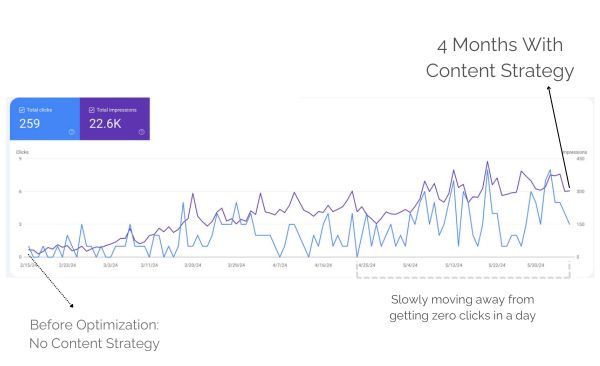
    Why is my website not showing on Google? Here’s the steps that you missed.

    “Why is my website not showing on Google?” There’s nothing more frustrating than pouring your heart and soul into crafting an article, only to realize it’s not attracting any traffic.

    You search for your targeted keywords, but your content is nowhere to be found. Often, this happens because your page isn’t indexed by Google.

    And before you panic, know this—getting indexed isn’t rocket science. In most cases, it’s just a matter of making sure Google actually knows your site exists.

    In this guide, I’ll walk you through:

    • Why indexing is the silent killer of new websites
    • How Google actually decides what to index (and what to ignore)
    • Step-by-step fixes—no technical jargon, just straight-up actionable steps
    • Common mistakes that keep sites hidden (and how to avoid them)
    • A few ninja tricks to get indexed faster

    Without indexing, your content is essentially invisible on search engines. In this guide, we’ll explore how to get Google to index your site faster using RankMath, a powerful WordPress SEO plugin.

    Stick around till the end for some bonus tips to enhance your indexing success.


    Understanding Google Indexing

    Why Your Site is Ghosting Google

    Before diving into practical steps, it’s essential to grasp the basic concept of how Google indexing works.

    Imagine throwing a party but forgetting to send out invites. That’s essentially what’s happening if your site isn’t indexed.

    Google doesn’t magically know about every new website. It relies on two key processes:

    1. Discovery (Crawling)

    Google continuously searches for new and updated web pages using robots or spiders known as Google bots. These bots either follow links from known pages or use site maps provided by website owners to discover new content. Once a URL is found, the bot crawls the page to analyze its content and layout.

    Google’s bots (called “spiders”) constantly crawl the web, following links from site to site.

    If you check any of the below:

    • No other sites link to yours
    • You haven’t submitted a sitemap
    • Your site is brand new

    …there’s a good chance Google hasn’t found you yet.

    2. Indexing

    After a page is crawled, Google processes it to understand its purpose, meaning, and context. This includes analyzing the title tag, text content, alt attributes, images, and videos. The page is then sorted and ranked based on different search terms. Our focus here is to ensure your content gets indexed, setting the stage for better ranking.

    Once Google discovers your page, it analyzes:

    • Content quality (Is this actually useful?)
    • Technical setup (Can Google read it properly?)
    • Uniqueness (Is this just copied from somewhere else?)

    If everything checks out, your page gets stored in Google’s index—AKA the database that powers search results.

    No index = No rankings. Simple as that.


    Steps to Get Your Pages Indexed

    Force Google to Notice Your Site

    Step 1: Claim Your Spot in Google Search Console

    Think of Google Search Console (GSC) as your backstage pass to Google’s indexing system.

    1. Go to Google Search Console
    2. Add your site (Choose “URL prefix” for simplicity, or simply deciding whether you will use www. or not)
    3. Verify ownership (The HTML file method is easiest for most)

    This is non-negotiable. Without GSC, you’re flying blind.

    Step 2: Submit a Sitemap (Google’s Roadmap to Your Site)

    A sitemap is like handing Google a neatly organized list of all your important pages.

    A sitemap is a file where you provide information about the pages, videos, and other files on your site, and the relationships between them. Search engines like Google read this file to crawl your site more intelligently.

    For WordPress Users (The Easy Way):

    1. Install Rank Math (or Yoast SEO)
    2. Enable XML sitemaps (usually automatic)
    3. Find your sitemap at yoursite.com/sitemap_index.xml
    4. Paste it into GSC > Sitemaps

    For Other Platforms:

    • Squarespace/Wix: yoursite.com/sitemap.xml (auto-generated)
    • Shopify: Use an app like Smart SEO
    • Custom Sites: Generate one with Screaming Frog

    Step 3: Manually Request Indexing (The Fast Pass)

    Manual request means using the URL Inspection Tool

    For individual pages, you can use the URL Inspection tool in Google Search Console to see if a page is indexed and request indexing if it’s not.

    Found a page that’s still MIA?

    • Open Google Search Console
    • Use the URL Inspection Tool
    • Paste the page URL
    • Click “Request Indexing”

    This is like tapping Google on the shoulder and saying, “Hey, check this out.”

    Step 4: Enable Instant Indexing

    For time-sensitive content, such as news articles or live events, instant indexing can be crucial. RankMath and some SEO plugins offers an Instant Indexing plugin for Google that allows you to send URLs directly to Google’s API.

    1. Go to RankMath > Instant Indexing.
    2. Add new URLs or updated URLs and hit “Send to API.”

    Common Indexing Issues

    Why Google Might Be Ignoring You (And How to Fix It)

    Certain settings and content types can prevent your pages from being indexed:

    Mistake #1: You Accidentally Blocked Google

    Check your robots.txt file and meta tags to ensure they’re not blocking Google’s bots.

    If you have an e-commerce site or use filters, you might accidentally create thousands of duplicate URLs. Use your robots.txt file to block unnecessary pages from being crawled.

    Quick Check:

    • robots.txt (Visit yoursite.com/robots.txt—look for Disallow: /)
    • noindex tags (View page source → search for noindex)

    Another Fix:

    • In WordPress, go to Settings > Reading → Uncheck “Discourage search engines”
    • In Rank Math/Yoast, ensure pages aren’t set to noindex

    Mistake #2: Your Site Has Zero Backlinks

    Google discovers most new sites through links. No links = Harder to get crawled.

    Quick Fixes:

    • Share on social media (even just Twitter helps)
    • Submit to niche directories (like Blogarama for blogs)
    • Comment on relevant forums (with legit, useful responses)

    Mistake #3: Thin or Duplicate Content

    If your site has multiple pages with similar content, Google might struggle to decide which one to index. Fix this by using canonical tags (Rank Math can help with this) or consolidating similar pages.

    Google won’t waste time indexing:

    • Pages under 300 words
    • Copied product descriptions
    • “Coming soon” placeholders

    Solution:

    • Combine weak pages into stronger ones
    • Use canonical tags for similar content
    • Add original insights (even to product pages)

    Tips for Better Indexing

    Internal Linking

    Leverage internal links from indexed pages to new content. This helps search engines discover your new pages faster.

    Got an old post that’s already indexed? Link to your new page from it. Google crawls known pages frequently, so this acts like a bat signal.

    Produce High-Quality Content

    Always create unique, valuable content that directly answers specific queries. This increases the likelihood of your content being deemed worthy of indexing.

    Manage Crawler Traps

    For e-commerce sites, avoid creating too many filter-generated URLs, which can confuse search engines. Use your robots.txt file to block unnecessary pages from being crawled.

    Avoid Overloading Your Site: Too many low-quality or thin pages can slow down indexing. Focus on creating fewer, high-quality pages instead.

    The Social Trigger

    Posting on Twitter/LinkedIn with a link? Google’s crawlers monitor social signals. It’s not a ranking factor, but it can speed up discovery.

    Final Reality Check

    Getting indexed is Step Zero of SEO. If you skip this, nothing else matters.

    Today’s Action Plan:

    1. Sign up for Google Search Console (10 minutes)
    2. Submit your sitemap (5 minutes)
    3. Inspect your top 3 pages (3 minutes)

    That’s it. No fancy tools required—just making sure Google knows you exist.

    Question for you: Have you checked your robots.txt file lately? (Most people haven’t—and it’s costing them traffic.) Drop a comment if you want me to break it down further

    Other WordPress Plugins You Can Use

    While Rank Math is my top recommendation, there are other excellent plugins you can use:

    1. Yoast SEO

    Yoast SEO is another powerhouse plugin that makes sitemap creation easy. Here’s how to use it:

    1. Install and activate Yoast SEO from the WordPress plugin directory.
    2. Go to SEO > General in your dashboard.
    3. Click the Features tab and make sure the XML sitemap toggle is enabled.
    4. Your sitemap will be automatically generated and available at https://yourwebsite.com/sitemap_index.xml.
    5. Submit it to Google Search Console using the same steps as above.

    2. All in One SEO (AIOSEO)

    AIOSEO is another user-friendly option:

    1. Install and activate the plugin.
    2. Go to All in One SEO > Sitemaps in your dashboard.
    3. Enable the sitemap feature if it’s not already on.
    4. Your sitemap will be available at https://yourwebsite.com/sitemap.xml.
    5. Submit it to Google Search Console.

    When Using other CMS

    Below is a quick overview on how to generate sitemap for when you’re using other content management systems for your websites:

     Generating and Submitting a Sitemap on Squarespace

    Squarespace also automatically generates a sitemap for your site. Here’s how to access and submit it:

    Step 1: Find Your Sitemap URL

    1. Log in to your Squarespace account and go to your site’s dashboard.
    2. Squarespace automatically generates a sitemap. Your sitemap URL will look like this: https://yourwebsite.com/sitemap.xml.

    Step 2: Submit Your Sitemap to Google

    1. Go to Google Search Console.
    2. Select your website property.
    3. Navigate to Sitemaps in the left-hand menu.
    4. Enter sitemap.xml in the field and click Submit.

    Squarespace takes care of updating your sitemap whenever you add or remove pages.

    Generating and Submitting a Sitemap on Wix

    Wix makes it super easy to generate and submit a sitemap—it’s all done automatically! Here’s how to access and submit it:

    Step 1: Find Your Sitemap URL

    1. Log in to your Wix account and go to your site’s dashboard.
    2. Wix automatically generates a sitemap for you. Your sitemap URL will look like this: https://yourwebsite.com/sitemap.xml.

    Step 2: Submit Your Sitemap to Google

    1. Go to Google Search Console.
    2. Select your website property.
    3. Navigate to Sitemaps in the left-hand menu.
    4. Enter sitemap.xml in the field and click Submit.

    Wrapping Up

    Why is My Website Not Showing on Google?

    If your website isn’t showing up on Google, it’s likely because it’s not indexed.

    Indexing involves two main phases: discovery and processing of your pages. To ensure your site gets indexed, you should submit your sitemap via Google Search Console using a plugin like RankMath (when using WordPress), utilize the URL Inspection tool for individual pages, and enable instant indexing for time-sensitive content.

    Avoid common pitfalls such as duplicate content and improper use of robots.txt or meta tags and regularly monitor your indexing status and ensure your site’s settings are optimized for search engines.

    Why not take a few minutes today to set up Rank Math, submit your sitemap, and make sure your site is ready to be discovered. Your future visitors (and your traffic stats) will thank you!


    Read more case studies or articles about on-page SEO and technical SEO. You can also check out my available services: